Layout thrashing occurs when repeated DOM reads and writes prevent the browser from batching updates, forcing it to recalculate layout more often than necessary. A change to one element can affect its children, siblings, or parents, so reading layout information after a write may require the browser to first account for that change. section 12.4
Reduce unnecessary recalculations by grouping operations:
- Read the layout values you need first, then perform the DOM writes together. section 12.4 section 12.5
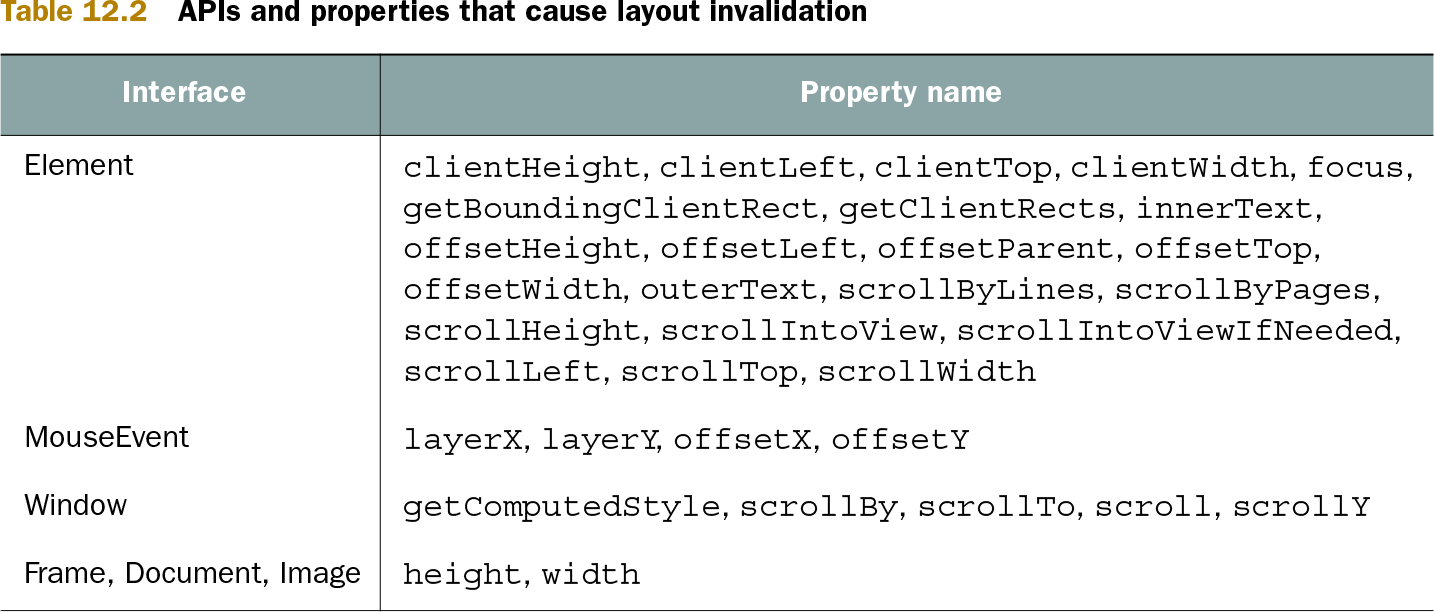
- Watch for layout-dependent reads such as clientWidth, offsetWidth, and getBoundingClientRect after a DOM change. section 12.4 section 12.5
Listing 12.10. Consecutive series of reads and writes causes layout thrashing
<div id="ninja">I’m a ninja</div>                          #A
<div id="samurai">I’m a samurai</div>                      #A
<div id="ronin">I’m a ronin</div>                          #A
<script>
  const ninja = document.getElementById("ninja");          #B
  const samurai = document.getElementById("samurai");      #B
  const ronin = document.getElementById("ronin");          #B

  const ninjaWidth = ninja.clientWidth;                    #C
  ninja.style.width = ninjaWidth/2 + "px";                 #C
                                                           #C
  const samuraiWidth = samurai.clientWidth;                #C
  samurai.style.width = samuraiWidth/2 + "px";             #C
                                                           #C
  const roninWidth = ronin.clientWidth;                    #C
  ronin.style.width = roninWidth/2 + "px";                 #C
</script>
See how alternating width reads and style writes across three elements can trigger repeated layout work. section 12.4
Listing 12.11. Batch DOM reads and writes to avoid layout thrashing
<div id="ninja">I’m a ninja</div>
<div id="samurai">I’m a samurai</div>
<div id="ronin">I’m a ronin</div>
<script>
  const ninja = document.getElementById("ninja");
  const samurai = document.getElementById("samurai");
  const ronin = document.getElementById("ronin");

  const ninjaWidth = ninja.clientWidth;                    #A
  const samuraiWidth = samurai.clientWidth;                #A
  const roninWidth = ronin.clientWidth;                    #A

  ninja.style.width = ninjaWidth/2 + "px";                 #B
  samurai.style.width = samuraiWidth/2 + "px";             #B
  ronin.style.width = roninWidth/2 + "px";	               #B
</script>
Compare the read-then-write version, which batches the widths before changing styles. section 12.4
Table 12.2. APIs and properties that cause layout invalidation (view table figure)
| Interface |
Property name |
|---|---|
| Element | clientHeight, clientLeft, clientTop, clientWidth, focus, getBoundingClientRect, getClientRects, innerText, offsetHeight, offsetLeft, offsetParent, offsetTop, offsetWidth, outerText, scrollByLines, scrollByPages, scrollHeight, scrollIntoView, scrollIntoViewIfNeeded, scrollLeft, scrollTop, scrollWidth |
| MouseEvent | layerX, layerY, offsetX, offsetY |
| Window | getComputedStyle, scrollBy, scrollTo, scroll, scrollY |
| Frame, Document, Image | height, width |
Review DOM and window APIs and properties that can invalidate layout. section 12.4