React.lazy defines a component whose module loads only when React first renders it. Pair it with Suspense so users see fallback UI instead of a stalled interface. section 11.0 section 11.4
Use lazy components by following these rules:
- Pass lazy a function that returns the promise from a dynamic import. section 11.2.1
- Resolve the promise to a module whose default export is the component. section 11.2.1
- Place the rendered lazy component below a Suspense boundary with suitable fallback content. section 11.2.3
- Use an error boundary for rejected loading promises or errors raised while rendering. section 11.2.3
Load a calendar after user interaction
const LazyCalendar = lazy(() => import("./Calendar.js"));\n\nfunction CalendarWrapper() {\n const [isOn, setIsOn] = useState(false);\n return isOn ? (\n <LazyCalendar />\n ) : (\n <button onClick={() => setIsOn(true)}>Show Calendar</button>\n );\n}\n\nA route-level version lazily imports BookingsPage, BookablesPage, and UsersPage, while a shared Suspense boundary renders a PageSpinner during loading. section 11.2.4
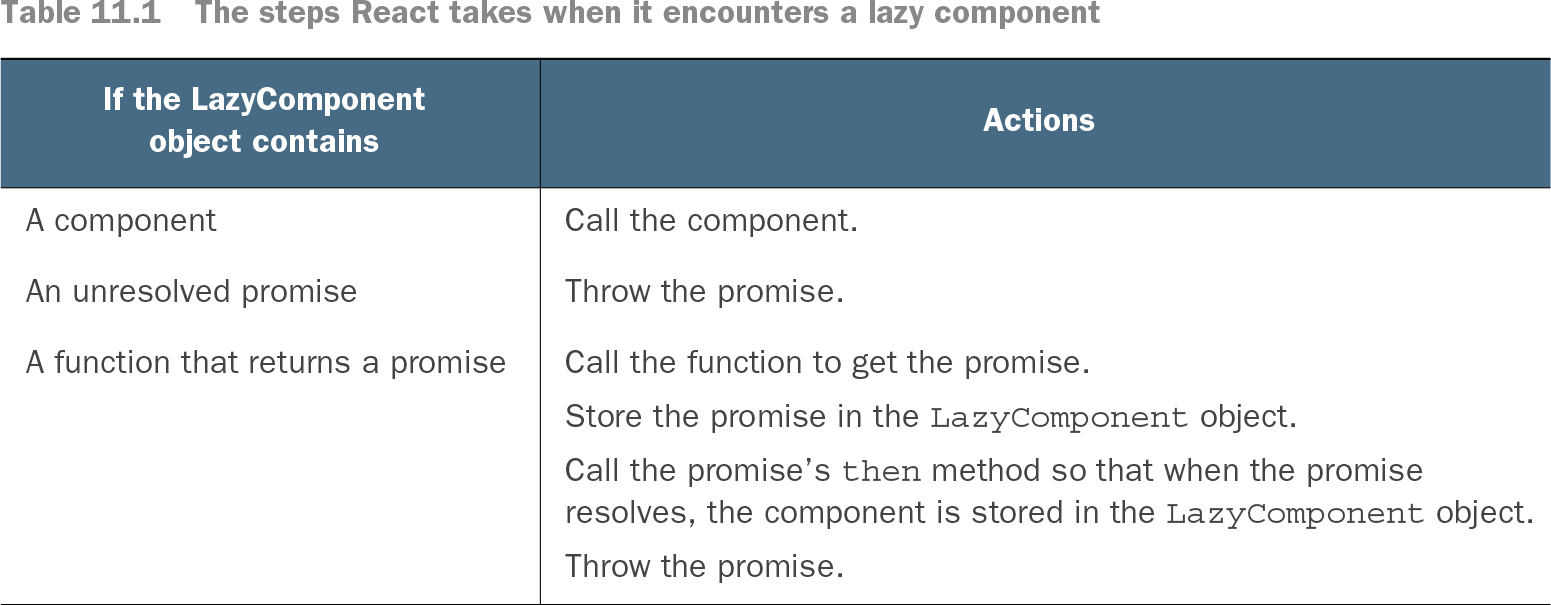
Table 11.1 The steps React takes when it encounters a lazy component (view table figure)
Trace how React handles a lazy component containing a component, an unresolved promise, or a promise-returning loader. section 11.2.3