Legibility is how easily readers can distinguish individual characters and words. Typography improves it through typefaces, sizes, styles, spacing, alignment, and indents. section 18.0
For text viewed on laptops, tablets, and smartphones, audition typefaces for these friendly-to-small-screens traits:
- Large counters: enclosed spaces inside letters such as A, R, d, and g. section 20.3
- Large apertures: partially enclosed spaces inside letters such as C, S, a, and e. section 20.3
- A medium-to-large x-height: lowercase letters reach a useful height, often at least half the font size. section 20.3
- Low-to-medium stroke contrast: extremely thin strokes are less likely to disappear on small screens. section 20.3
Audition a typeface
Open Google Fonts, preview a typeface, enter your own text, and inspect the result. Check counters, apertures, x-height, and stroke contrast before assigning one face to headings and another to body text. section 20.3
Figure 20.2 When deciding on a typeface that will render well even on small displays, look for larger counters and apertures, good x-height, and low stroke contrast.
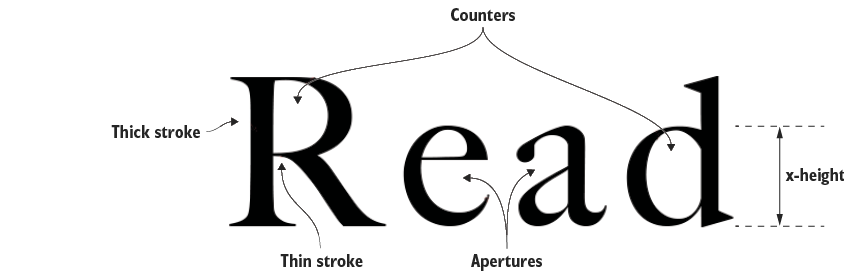
Compare the letter shapes visually: larger counters and apertures, a good x-height, and low stroke contrast support legibility on small displays. section 20.3
