liveBook · Manning

Email source code

As explained in AI for Everyday IT

Email source code is the raw structured content of an email message, including its headers, body markup, and embedded metadata.

Email source code is the jumble of headers and message content behind an email. It can help investigate suspicious messages, especially those requesting clicks or sensitive information. section 7.1.3

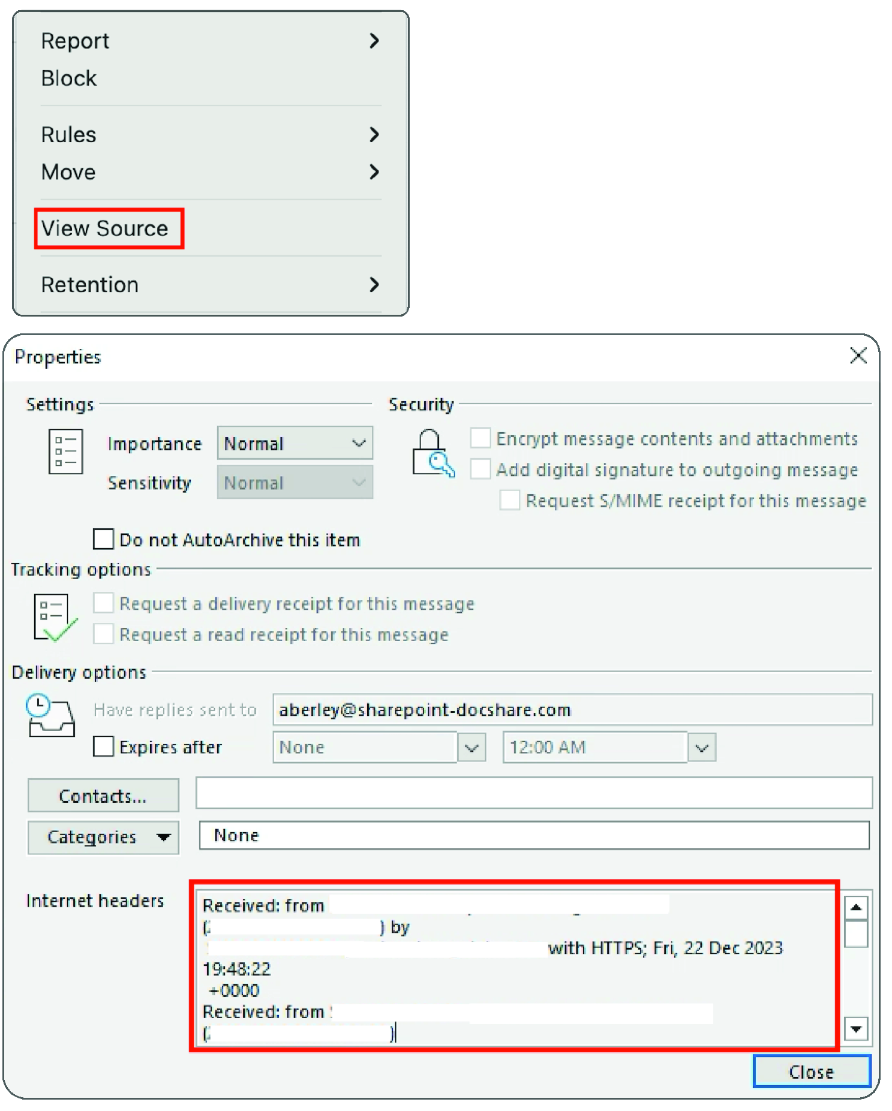
In Outlook for Mac, right-click the message and choose View Source. In Outlook for PC, open the message, choose File, and select Properties. Copy the displayed source and headers into an AI service; you do not need to understand every line. section 7.1.3

Phishing check

Paste the source content into M365 Copilot and ask it to determine whether the email is a phishing attempt. Its analysis can identify authentication failures involving SPF, DKIM, and DMARC. section 7.1.3

Figure 7.2 Finding the source text and headers of an email in Outlook for Mac and PC
figure

Shows where Outlook for Mac and PC expose email source text and headers. section 7.1.3

How AI for Everyday IT covers it

How deep it goes
Explains where to retrieve source text and how to submit it for AI analysis, without teaching the source syntax.
Examples
Demonstrates Outlook source retrieval and M365 Copilot analysis of a potentially phishing email.
What it assumes
Assumes access to an email client and AI service while teaching that source text need not be understood line by line.
What you can do after
Diagnose possible phishing attempts by retrieving email source and asking an AI service to inspect it.
How it connects
Connects email headers with phishing, SPF, DKIM, DMARC, and M365 Copilot.

This explainer was generated by Manning's knowledge graph from the text of AI for Everyday IT. The section links point to the parts of the book it draws on.