liveBook · Manning

Passwd file

As explained in Python Workout, Second Edition

A passwd file is a Unix system file containing account records such as usernames and login-shell information.

A passwd file is a Unix system file with one colon-separated account record per line. Fields include the username, user ID, and login shell; comment lines may begin with #. section 4.17 section 6.18

Convert passwd records to TSV

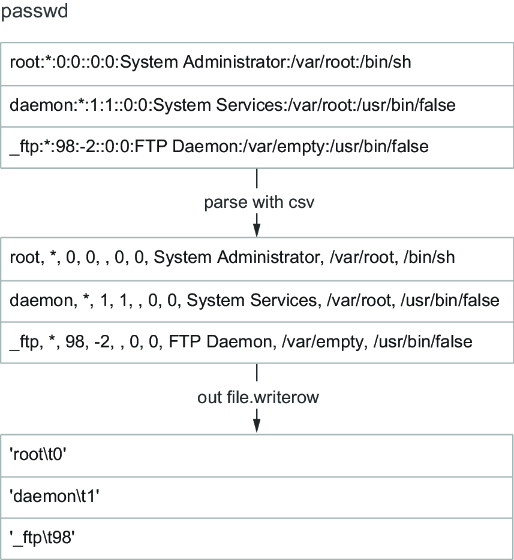
Use Python's csv module with a colon delimiter, skip comments, and write the username and user ID with TAB separation: import csv def passwd_to_csv(source, destination): with open(source) as infile, open(destination, 'w') as outfile: reader = csv.reader(infile, delimiter=':') writer = csv.writer(outfile, delimiter='\t') for row in reader: if row and not row[0].startswith('#') and len(row) > 2: writer.writerow([row[0], row[2]]) The resulting rows contain fields such as `root 0` and `daemon 1`. section 6.18

Figure 6.5 Graphical version of turning the passwd file into strings
figure

Trace the passwd file transformation from colon-separated records to selected output fields. section 6.18

How Python Workout, Second Edition covers it

How deep it goes
Explains delimiters, field indexes, comments, and output formatting, but stops short of broader system-account administration.
Examples
Uses /etc/passwd records, comment lines, username and user-ID extraction, and shell-frequency sorting.
What it assumes
Assumes familiarity with Python functions and file handling while practicing CSV readers, delimiters, and indexed fields.
What you can do after
Build a passwd-to-TSV converter and analyze shell usage with Python file and CSV operations.
How it connects
Connects Unix files with CSV parsing, Python's csv module, lists, tuples, sorting, and functions.

Related concepts

This explainer was generated by Manning's knowledge graph from the text of Python Workout, Second Edition. The section links point to the parts of the book it draws on.