liveBook · Manning

Lifecycle management rule

As explained in Microsoft Azure in Action

A lifecycle management rule is a configuration that specifies conditions and actions for managing stored blob data over time.

A lifecycle management rule automatically moves Azure Storage blobs between hot, cool, and archive tiers—or deletes them—when defined conditions are met. It turns changing access patterns into predictable storage-cost decisions. section 9.5.1

A rule combines:

  • Conditions such as days since a blob was last modified. section 9.5.1
  • Actions such as moving data to cool after 30 days, archive after 90 days, or deleting it after 365 days. section 9.5.1

Aging storage policy

A policy can keep recently changed blobs hot, transition them to cool after 30 days, archive them after 90 days, and delete them after a year. JSON makes the rule explicit and repeatable.

Figure 9.12 The tradeoff: the access costs go up for cool and archive tiers, whereas the storage costs go up for cold and hot tiers.
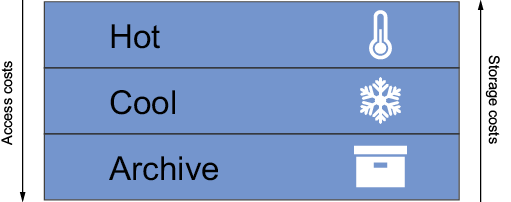
Compare storage-cost savings with the higher access costs and latency associated with cooler tiers. section 9.5.1

How Microsoft Azure in Action covers it

How deep it goes
Explains conditions, actions, filters, and JSON deployment, but stops short of exhaustive policy configuration.
Examples
Uses a 30-day cool transition, 90-day archive transition, 365-day deletion, and block-blob filter.
What it assumes
Assumes familiarity with hot, cool, and archive access tiers and their cost and latency trade-offs.
What you can do after
Operate/configure Azure Storage lifecycle policies with JSON and the Azure CLI.
How it connects
Connects blob storage with access tiers, storage costs, latency, and JSON policy definitions.

Related concepts

This explainer was generated by Manning's knowledge graph from the text of Microsoft Azure in Action. The section links point to the parts of the book it draws on.