Linguistic elements govern how a prompt expresses requirements. Adjusting precision, directness, and brevity gives distinct ways to address outputs that are too generic, exploratory, or wordy. section 3.0
Tune each element to address a different wording problem:
- Precision specifies requirements and scope boundaries, reducing room for interpretation. section 3.0 section 5.2.1
- Directness shifts instructions from implicit or hedged wording to explicit, action-oriented commands. section 3.0 section 5.2.1
- Brevity reduces wording and token cost while retaining the output quality needed. section 3.0 section 5.2.1
CI/CD analytics diagram
A broad request such as “whatever seems right” leaves component choices open. A more precise, direct request says: “Generate a clean CI/CD analytics architecture diagram. Include a source control webhook receiver, build orchestrator, test-results service, artifact registry, metrics pipeline, PostgreSQL for metadata, and object storage for build logs.” The task stays the same; the requirements become explicit and concise. section 3.0
Use the three controls as a diagnosis when revising a prompt: specify missing requirements, make the instruction more direct, or remove wording that does not help produce the desired output. In templates, linguistic elements work alongside structural elements and prompt patterns. section 3.0 section 5.2.1
Figure 5.2 Prompt template design stack linking structural elements, linguistic elements, and prompt patterns
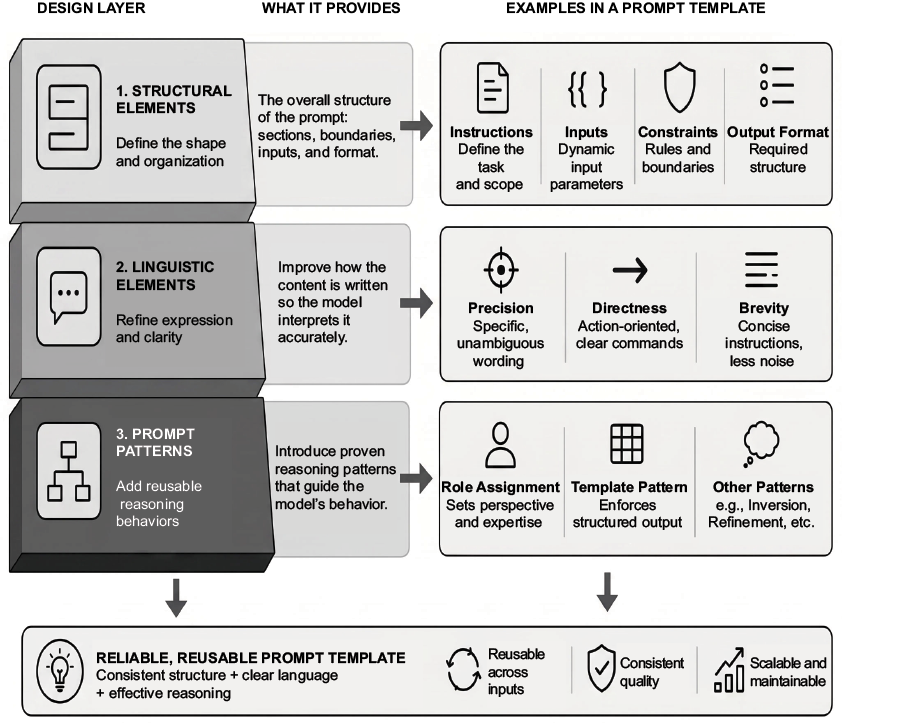
Shows linguistic elements alongside structural elements and prompt patterns in a prompt-template design stack. section 5.2.1
