Imagine keeping a to-do list in memory. An array puts the tasks next to one another, but adding a task can be awkward if the next space is occupied: the whole list may need to move. A linked list lets the tasks live in separate places instead. section 2.2
Think of a treasure hunt. The first item tells you the address of the next item, which tells you where to find the next, and so on. That stored address is a pointer. To add an item, you can put it in available memory and change a link; the existing items do not need to move. section 2.3 section 2.6
Linked memory addresses
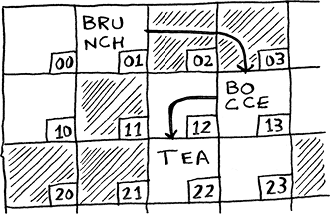
Follow the linked memory addresses to see how items form a list without sitting together. section 2.3
The trade-off depends on what you need to do:
- Insert or delete an item: once you can access the relevant place, changing a link avoids shifting the later items as an array would. The change can take O(1) time, but finding that place may take longer. section 2.6 section 2.7
- Read items in order: start at the first and follow each link. To reach the tenth item, you must pass through the first nine; an array can jump directly to it. section 2.4 section 2.8
- Use memory: a list needs space for a pointer in every item. Arrays can also read adjacent items efficiently through caching, so they are often the better choice for reads. section 2.8
Put a task in schedule order
Suppose a new task belongs in the middle of your to-do list. In a linked list, change the preceding item's link to insert it there. In an array, the later tasks must shift to make room—and the array may need a new location if it has no space. section 2.6







