A Linux namespace gives a process a limited view of a particular kind of system resource. A process in a container can therefore see different files, processes, network interfaces, or a different hostname from processes elsewhere on the same host. The view can feel like a separate computer, even though the processes share a kernel. section 2.3.1
There is not just one namespace per process. Each process belongs to a namespace for each resource type, and processes can share some namespaces while keeping others separate. section 2.3.1
Common types control what a process can see:
- Network namespaces isolate network interfaces, stacks, and ports; mount namespaces isolate filesystem mount points. section 2.3.1
- PID namespaces isolate process IDs; IPC namespaces isolate mechanisms such as message queues and shared memory. section 2.3.1
- UTS namespaces isolate hostnames and NIS domain names; user namespaces isolate user and group IDs. Time and cgroup namespaces provide further separate views. section 2.3.1
Kubernetes uses selective sharing to make a pod: a group of related containers running together. Containers in one pod share a network namespace, so they have the same IP address and port space and cannot both bind the same port. They also share UTS and IPC namespaces. A shared PID namespace is optional; without it, the containers cannot see each other's processes or send them process signals. Each container retains its own mount namespace. section 3.3.1 section 5.1.1
Figure 5.3 Containers in a pod share the same network interfaces.
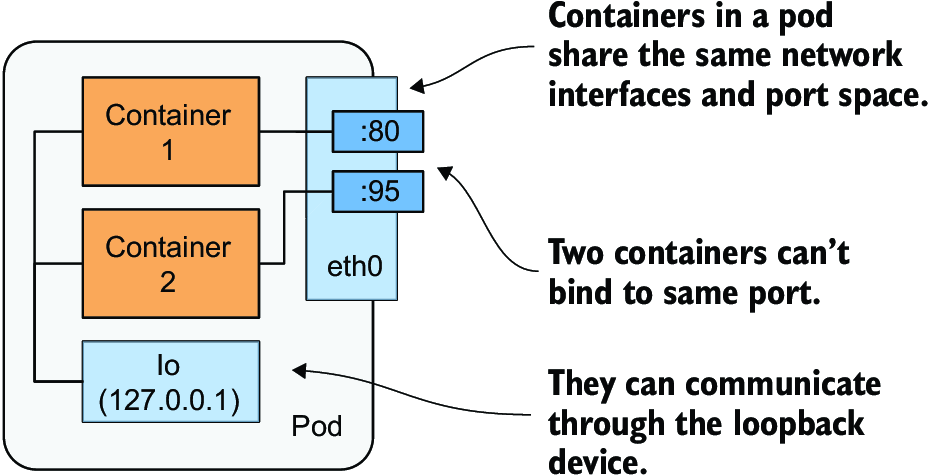
The diagram shows why containers in one pod use the same network interfaces rather than receiving separate pod networks. section 5.1.1
Inspecting a host view
In Docker Desktop, a specially configured container can join the Linux VM host's network, IPC, UTS, and PID namespaces using Docker's --net=host, --ipc=host, --uts=host, and --pid=host flags. From its shell, ps aux and ip addr then reveal the VM's processes and network interfaces. This example also grants unrestricted system-call access and mounts the host filesystem; it is an inspection technique, not an ordinary application-container configuration. section 3.1.1
Namespaces limit visibility, not resource consumption or every action a process can take. Control groups limit resource use; privileges and other security features strengthen isolation. Because containers share the host kernel, namespaces alone do not make them fully isolated. Node agents that need access beyond an ordinary pod's isolated view require appropriate pod configuration. section 2.3.4 section 17.2

