A container can still be running even when its process has hung or its service no longer responds. Kubernetes cannot recognize every application-specific failure on its own. A liveness check gives it a signal: when the check fails enough times, Kubernetes restarts the affected workload. section 4.1 section 4.1.3
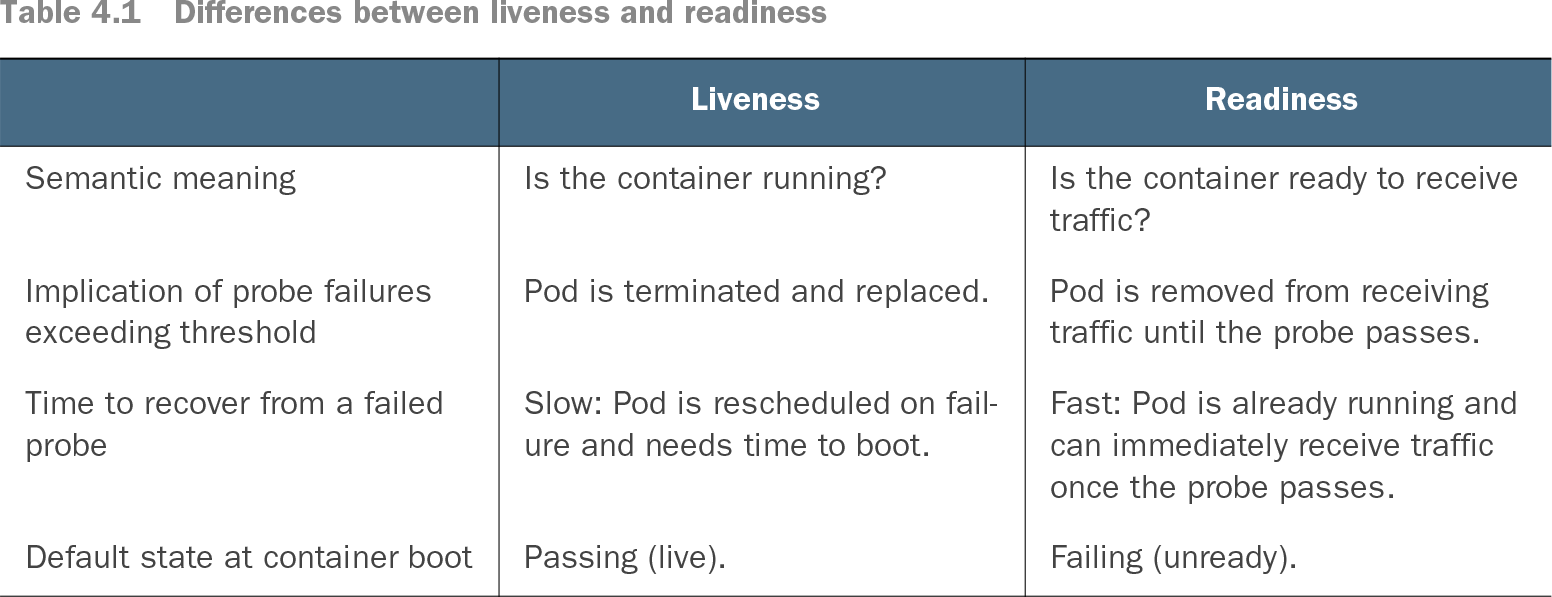
Table 4.1 Differences between liveness and readiness (view table figure)
| Pod is removed from receiving traffic until the probe passes. |
||
| Fast: Pod is already running and can immediately receive traffic once the probe passes. |
||
Compare liveness with readiness before choosing what a failed check should mean: restart a failing workload, or temporarily stop sending it traffic. section 4.1.1
Keep the two decisions separate. A container waiting for a database may be unable to serve requests but still be functioning well enough to reconnect. Its readiness check should fail; its liveness check should normally keep passing. Because restarting takes time, tune liveness to be less hasty than readiness. section 4.1.1 section 4.1.4
Choose a check that demonstrates the container is making progress:
- For an HTTP service, use a lightweight dedicated endpoint such as /healthz that returns HTTP 200 when server code responds. Configure it under livenessProbe in the Deployment; a basic example checks every 30 seconds and allows repeated failures before restarting. section 4.1.4 section 4.1.3
- For a background worker without an HTTP or TCP endpoint, use a command-based probe. The worker can periodically write a timestamp, and the command can fail when that timestamp grows too old. section 10.4
When waiting becomes stuck
If a container remains unready because faulty retry logic never restores a connection, continually passing liveness checks will not restart it. One approach records the last successful readiness check and fails liveness only after prolonged unreadiness, giving the container time to recover first. section 4.1.5