A logical parameter gets its value from decision logic rather than a fixed input. It should also define a fallback for cases where the script cannot determine a suitable value. section 10.5
Use logical parameters when configuration can be selected from the environment:
- Check for an external virtual switch first, then try the default switch; if neither is available, leave networking disabled. section 10.5
- Retrieve Hyper-V’s default virtual-machine location and append a folder named for the virtual machine. section 10.5
- Keep the fallback operationally safe: a virtual machine can still install its operating system without a switch. section 10.5
Selecting a virtual switch
A script can inspect available switches, prefer an external switch, fall back to the default switch, and omit the connection when no switch is found. section 10.5
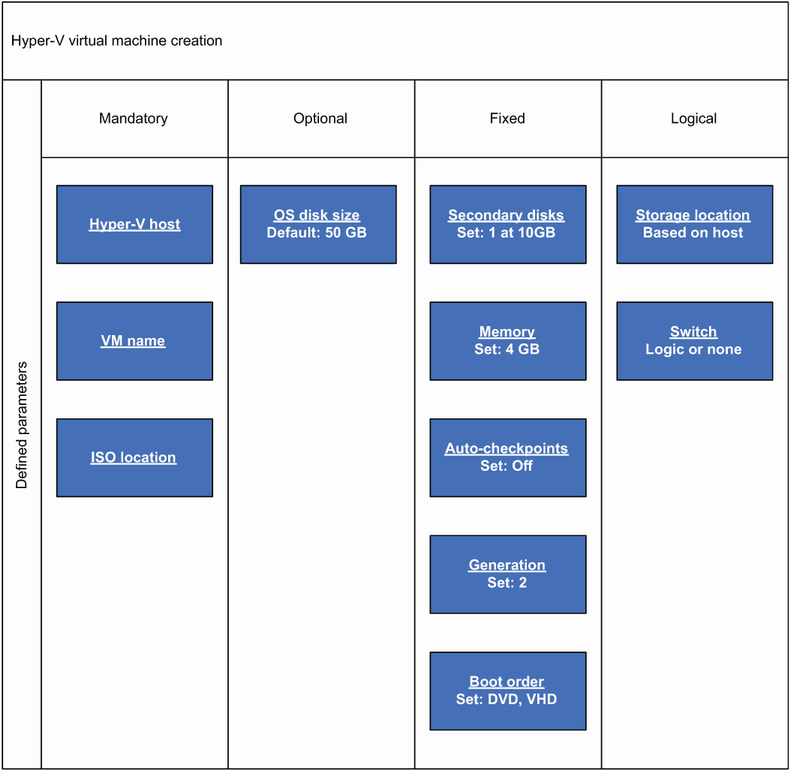
Figure 10.2 Hyper-V virtual machine creation parameters broken down into buckets for mandatory (values that must be supplied), optional (values that have a default value but can be overwritten by the user), fixed (values that are hardcoded), and logical (values that are determined by logic in the script)
Compare logical parameters with mandatory, optional, and fixed parameters when designing Hyper-V virtual-machine creation automation. section 10.5
