Unified DevOps posture visibility centralizes security insights from code, dependencies, secrets, and container images across source code repository systems. It helps shift security left while giving security teams visibility through the Microsoft Defender for Cloud dashboard, complementing developer-focused tools such as GitHub Advanced Security. section 11.4
Defender for DevOps groups its capabilities around several security outcomes:
- Provide security insights about code, dependencies, secrets, and container images in source code repositories. section 11.4
- Secure infrastructure-as-code templates and container images to reduce cloud misconfigurations reaching production. section 11.4
- Add code-to-cloud context so teams can prioritize misconfigurations detected for DevOps resources. section 11.4
- Expose unresolved security findings to developers through pull request annotations. section 11.4
Onboard GitHub or Azure DevOps repositories through the Defender for Cloud dashboard. The click-through wizard creates a security connector that stores selected configuration preferences and connects Defender for Cloud to the source code system. section 11.4.1
A GitHub onboarding flow requires these operational steps:
- Use an identity with Contributor access on the Azure subscription and Security Admin access in Defender for Cloud. section 11.4.1
- In Environment Settings, add a GitHub environment, name the connector, select the subscription, resource group, and region, then authorize the connection. section 11.4.1
- Install the Defender for DevOps app on the repositories after authorization. section 11.4.1
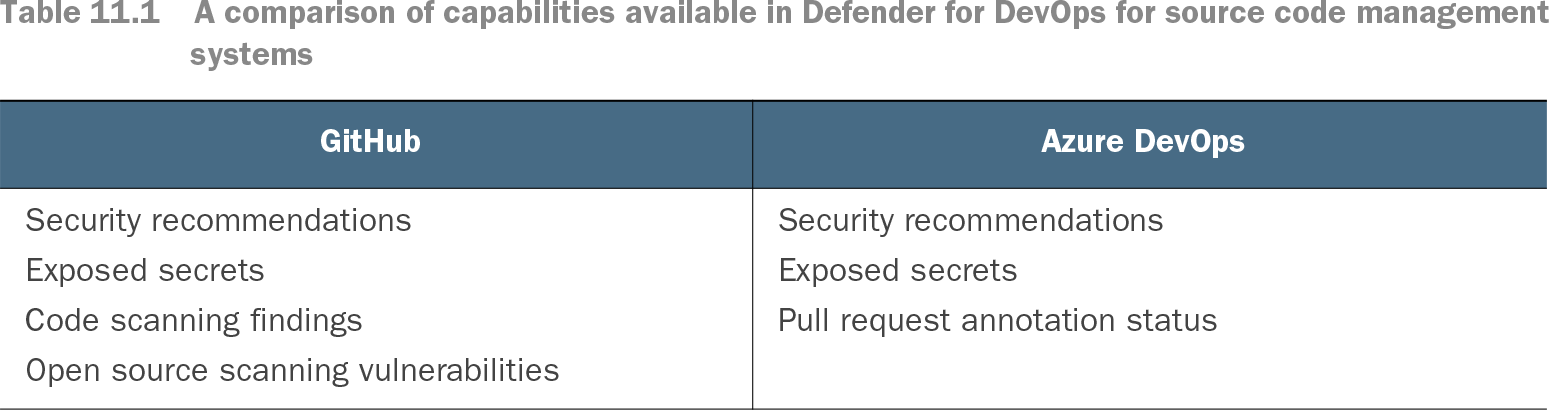
Table 11.1 A comparison of capabilities available in Defender for DevOps for source code management systems (view table figure)
Compare available Defender for DevOps findings and recommendations across GitHub and Azure DevOps, including exposed secrets, code scanning, open source scanning, and pull request annotation status. section 11.4