A management group is an Azure governance scope above subscriptions. Use it when a control must span multiple subscriptions rather than being repeated separately in each one. Azure Policy can be assigned at this scope; the assignment evaluates existing resources for compliance, reports results, and evaluates future deployments. section 10.2.2
Choose the highest scope applicable to the organization. A policy or initiative assigned at management-group scope can establish broad guardrails, while narrower subscription, resource-group, and resource scopes remain available when controls need a smaller boundary. section 10.2.2
Use management groups to support layered governance and security operations:
- Apply Azure Policy initiatives or definitions broadly, then review compliance across existing and newly deployed resources. section 10.2.2
- Grant Azure RBAC permissions broadly when a role must cover a management group and its subscriptions, while favoring least-privilege roles for specific tasks. section 2.3.2
- Organize subscriptions in a hierarchy before deploying and managing Microsoft Defender for Cloud at scale. section 6.2.1
Guardrail across subscriptions
To restrict expensive virtual machine SKUs, assign the Allowed virtual machine size SKUs policy at an appropriate high-level scope and provide the allowed SKU values as assignment parameters. The resulting assignment records its name, policy definition, parameters, enforcement mode, and scope. Where a documented exception is necessary, create a policy exemption for the affected resource group; a Waiver accepts its noncompliance. section 10.2.2
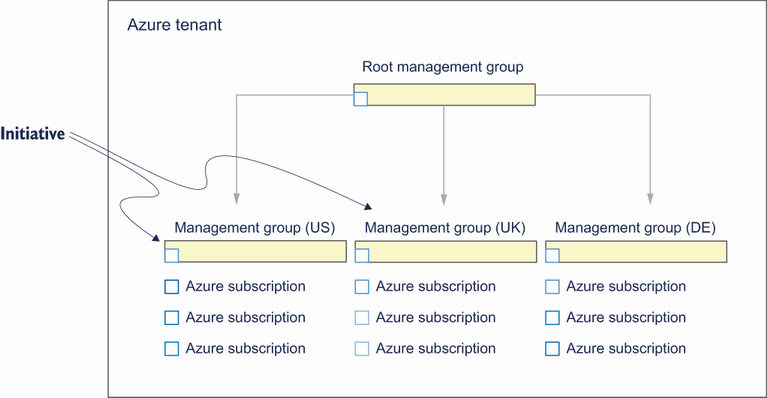
Use the scope diagram to place a policy definition or initiative at management-group level and distinguish that placement from lower Azure scopes. section 10.2.2
