A many-body force controls how nodes interact with one another in a force simulation. Its signed strength determines the effect: a negative force mimics repulsion, spreading nodes apart, while a positive force mimics attraction, drawing them together. In D3, create it with d3.forceManyBody(). section 12.4.1
Use many-body force as one part of a force layout rather than as a complete layout by itself. Combine it with positioning forces to guide nodes, collision force to prevent overlap, centering force to move the whole cluster, and link force to pull connected nodes together. section 12.4 section 12.5
When building a network visualization, use it to shape node spacing:
- Choose a negative many-body force when unrelated nodes should repel each other and remain visually separated. section 12.4.1
- Choose a positive many-body force when nodes should attract one another. section 12.4.1
- Balance it with link, collision, centering, and positioning forces to produce a readable arrangement. section 12.4
Character network
A Romeo and Juliet network represents characters as circles and shared scenes as links. Node size reflects each character’s number of lines, while nodes that share more scenes appear closer together. Many-body force participates in arranging the nodes alongside the other network forces. section 12.4.1 section 12.5
Figure 12.17 The many-body force influences how nodes interact with each other. A negative many-body force creates repulsion, while a positive one mimics attraction.
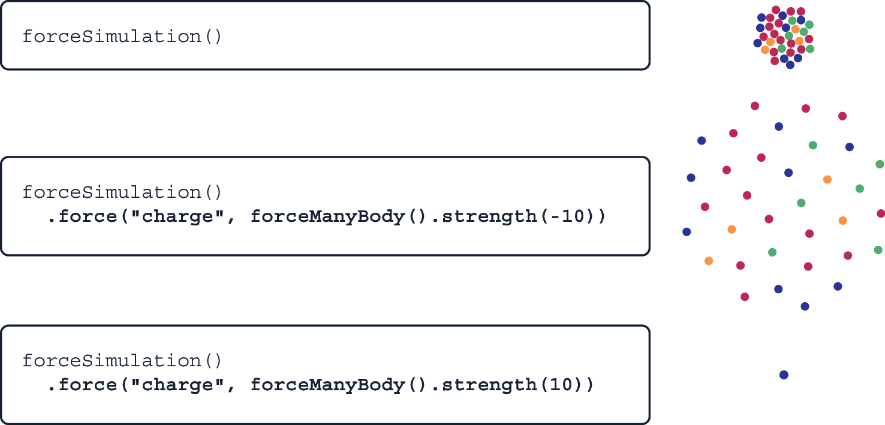
Compare the two signs visually: negative strength pushes nodes apart, and positive strength pulls them together. section 12.4.1
