Margin is the whitespace outside an element’s border. It creates separation between an element and nearby content, or between the element and the page edge. Margin is the outermost part of the CSS box model: content sits inside padding, padding sits inside a border, and margin sits outside that border. section 4.2.3 section 4.5
Figure 4.4 The main parts of an element box
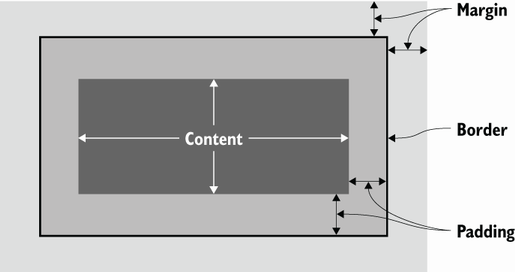
Use the box diagram to distinguish margin from padding: padding is inside the border, while margin is outside it. section 4.2.3
Set a different margin for each side with margin-top, margin-right, margin-bottom, and margin-left. Values are measurements such as pixels (px). This is useful when an element needs more space on one side than another. section 4.2.3
Give a footer uneven outer spacing
This rule adds 24px above the footer, 40px to its right, 32px below it, and 48px to its left: footer { margin-top: 24px; margin-right: 40px; margin-bottom: 32px; margin-left: 48px; } The shorthand form produces the same result, with values ordered top, right, bottom, left: footer { margin: 24px 40px 32px 48px; } section 4.2.3
When customizing a page, adjust the number in an existing padding or margin value to increase or decrease space. Keep the px unit in place. Where accessibility is a concern, px measurements can be converted to rem; by default, 16px equals 1rem. section 6.4 section 9.6
Center a constrained page body
A body rule can combine a maximum width, automatic horizontal margins, and padding: body { max-width: 800px; margin: 0 auto; padding: 25px; line-height: 1.5; } Here, margin is one of several values you can customize while keeping the unit attached to numeric spacing values. section 6.4
Quick check: if space is needed between text and its own border, use padding. If space is needed outside the border to separate the whole element from its surroundings, use margin. section 4.2.3

