MAXDOP limits how many processors SQL Server can use for parallel query or index operations. Mistake 1: setting a high value for one workload and assuming every operation benefits. A reporting query running at MAXDOP 16 can produce CX_PACKET and SOS_SCHEDULER_YIELD waits, slowing itself and competing queries. Before adding a fixed query hint, check whether SQL Server 2022 DOP feedback can adapt the degree from execution statistics. section 10.6
Choose MAXDOP deliberately rather than copying a server-wide value:
- Use DOP feedback for eligible SQL Server 2022 workloads when continuous adjustment is preferable to a permanent MAXDOP query hint. section 10.6
- Treat index rebuilds separately. An unspecified rebuild uses the database's default MAXDOP, which may not suit its maintenance window or fragmentation goals. section 11.8.1
- Use MAXDOP 1 for online index rebuilds when minimizing externally created fragmentation matters more than completing the operation quickly. section 11.5 section 11.8.1
MarketingArchive and ImpressionUID
Enable DOP feedback with ALTER DATABASE SCOPED CONFIGURATION SET DOP_FEEDBACK = ON. For an online, resumable rebuild of marketing.Impressions.ImpressionUID, specify ONLINE = ON, RESUMABLE = ON, MAX_DURATION = 1, and MAXDOP = 1; resume it in the next maintenance window with MAXDOP = 1.
Figure 11.9 Parallel index rebuild creates an index fragment for each processor.
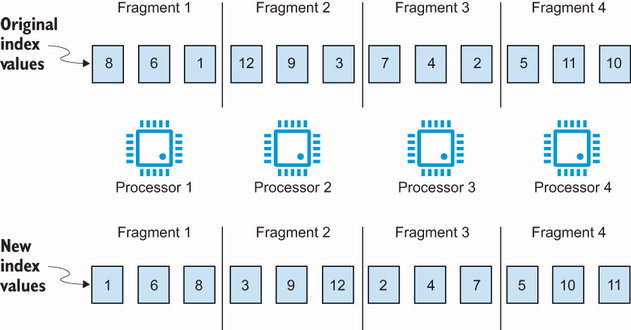
Use the figure to see why parallel index rebuilds create one fragment per processor and can leave more final fragmentation between fragments. section 11.8.1
