liveBook · Manning

Maze entrance

As explained in Learn Go with Pocket-Sized Projects

A maze entrance is the designated starting point from which a maze is traversed.

A maze entrance is the designated starting position for traversal. In an image-based maze, it is a path pixel distinguished from walls, ordinary paths, and the treasure by a palette color. section 9.1 section 9.3.1

A Go maze solver handles the entrance by:

  • Storing its RGBA color in a palette rather than relying on mutable global variables. section 9.3.1
  • Scanning every pixel within the image bounds and comparing each pixel with the configured entrance color. section 9.3.1
  • Returning the matching image.Point so traversal can begin from that coordinate. section 9.3.1
  • Returning an error when no entrance pixel exists, allowing Solve to stop with contextual error information. section 9.3.1

Finding the starting coordinate

findEntrance walks rows and columns, checks maze.RGBAAt(col, row) against s.palette.entrance, and returns image.Point{X: col, Y: row}. section 9.3.1

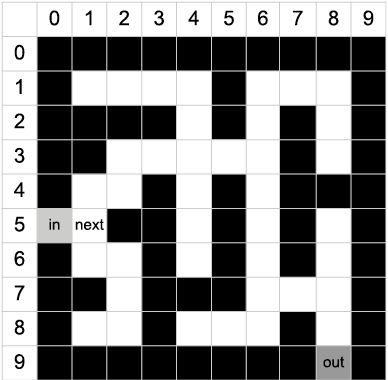
Figure 9.3 Maze with entrance and next pixel
A crossword puzzle with numbers

Description automatically generated

Visualizes the entrance together with the next pixel explored during maze traversal. section 9.3.1

How Learn Go with Pocket-Sized Projects covers it

How deep it goes
Explains palette-based pixel scanning, coordinate construction, and missing-entry errors, but stops before path traversal.
Examples
Uses PNG RGBA images, a dark-blue entrance pixel, palette fields, and a row-by-row coordinate scan.
What it assumes
Assumes familiarity with Go structures, methods, images, and coordinates while teaching palette-based entrance detection.
What you can do after
Build it from scratch by locating a color-coded entrance and passing its coordinate into a Go maze solver.
How it connects
Connects maze generation, maze solving, image processing, RGBA colors, paths, and treasure finding.

This explainer was generated by Manning's knowledge graph from the text of Learn Go with Pocket-Sized Projects. The section links point to the parts of the book it draws on.