liveBook · Manning

Html editor

As explained in Web Design Playground, Second Edition

An interactive source-code editor for entering and modifying HTML.

An HTML editor is the code-entry area where you type HTML tags and attributes, then inspect the result in a browser-like preview. It keeps experimentation pleasantly less fussy. section 1.5

Use the editor to:

  • Enter HTML tags and any attributes they require. section 1.5
  • Pair the HTML with CSS entered in a separate CSS editor. section 1.5
  • Check the Results box, repeat changes, and investigate margin error icons when something misbehaves. section 1.5
Figure 1.6 The Web Design Playground’s HTML editor highlights both the opening and closing tags when the cursor is inside one of them.
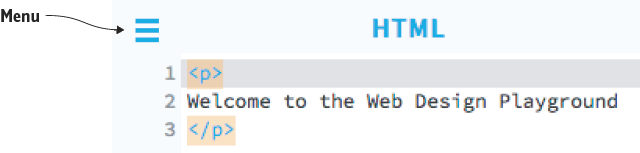
Tag highlighting helps match an opening tag with its closing partner while editing. section 1.5

How Web Design Playground, Second Edition covers it

How deep it goes
Explains the editing loop and feedback features, but stops short of underlying editor implementation.
Examples
Uses typed tags, CSS definitions, lesson files, Results-box previews, and margin error icons as working examples.
What it assumes
Assumes no prior HTML or CSS knowledge and teaches through immediately editable tags, attributes, and properties.
What you can do after
Apply it via the Web Design Playground to enter, modify, preview, and troubleshoot HTML.
How it connects
Connects HTML tags and attributes with CSS properties, browser rendering, and error detection.

Related concepts

This explainer was generated by Manning's knowledge graph from the text of Web Design Playground, Second Edition. The section links point to the parts of the book it draws on.