A menu is a set of links that helps visitors reach the main sections or functions of a website. It usually appears as a brief horizontal bar near the top of each page and serves as the site’s primary navigation system. section 3.3.1 section 3.6
Plan a menu that stays easy to scan:
- Organize pages into a few parent categories, then place related child pages beneath them as submenus. section 3.3.1
- Keep the main menu brief, usually to five or six descriptive parent items. section 3.3.1 section 3.7
- Combine similar items, demote less important choices to a sidebar or footer, and remove redundant entries. section 3.3.6
- Rename the home page, display child pages correctly, and check menu links for errors. section 3.6
- Pair the menu with a search tool; larger sites may also add a detailed site map in the footer. section 3.3.7
Fishing-site menu
A fishing website might use News, Tips & Techniques, Tournaments, and Contact Us as main items. Related pages such as Schedule, Results, and Standings can appear under Tournaments, while detailed gear or forum topics can be grouped into submenus. section 3.3.1 section 3.3.6
Figure 3.1 A contemporary website page usually includes at least these seven elements: the site title, the site tagline (slogan), a banner image, the page title, the menu, the body content, and a call to action.
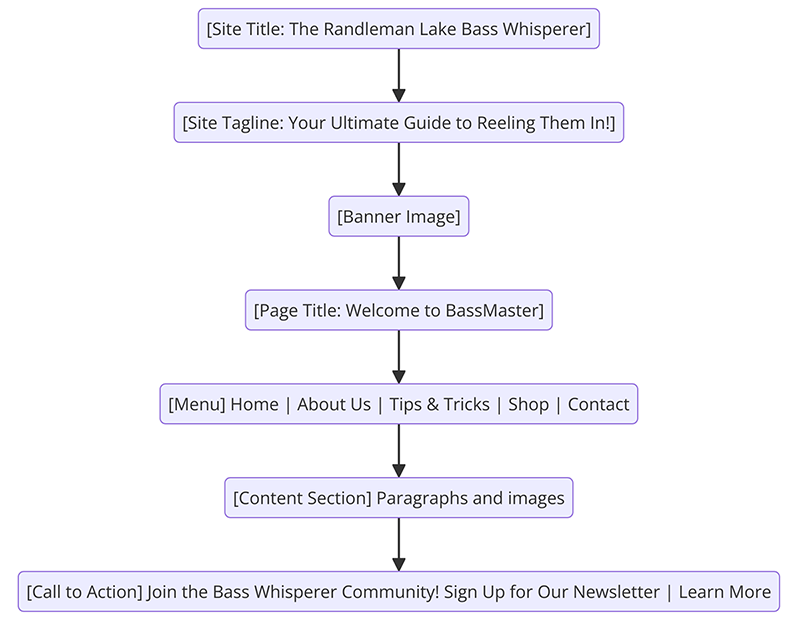
Use the page layout diagram to see the menu alongside the site title, tagline, banner, page title, body content, and call to action. section 3.3.1


