A meta-repository aggregates separate code repositories into a cohesive virtual repository. It restores much of a monorepo’s convenience while preserving independent repositories and deployment schedules. section 12.2.4
Build a meta-repository around a collection of microservices:
- Install the meta tool and create a .meta configuration file. section 12.2.4
- List each repository under the file’s projects collection, mapping service names to repository URLs. section 12.2.4
- Run one meta command to perform Git operations across the entire collection, such as meta git pull. section 12.2.4
- Create focused meta-repositories for the services a developer normally changes, or for complete application configurations with Docker Compose files. section 12.2.4
A FlixTube service collection
A .meta file can group gateway, azure-storage, video-streaming, video-upload, history, and metadata repositories. Cloning the aggregate gives a developer a convenient working set while each service remains independently stored and deployable. section 12.2.4
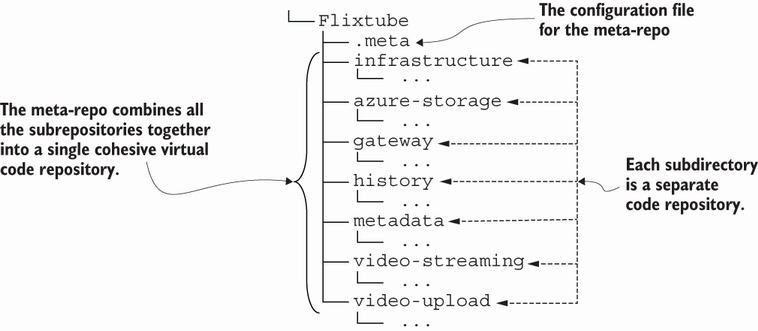
The configuration diagram shows how one .meta file ties separate service repositories into a single aggregate. section 12.2.4
Meta-repositories fit a scaling path in which microservices occupy separate repositories and use independent continuous-delivery pipelines. Branch-based workflows can deploy test and production branches to separate environments. section 12.11
