A micro-partition is a Snowflake-managed, contiguous unit of table storage. Each contains about 50 MB to 500 MB of uncompressed data; stored data is smaller because Snowflake compresses it. Micro-partitions are columnar: values for a column are stored adjacent to one another, favoring reads and processing that use selected columns rather than individual-row access patterns. section 8.3
Snowflake creates micro-partitions automatically as rows are inserted into tables. Inserted data often follows natural dimensions such as date, time, or geographical origin, so rows with similar values are colocated where possible. A value may span more than one micro-partition, preventing uneven partition sizes but affecting how selectively filters can eliminate storage. section 8.3
Micro-partitions retain metadata, including each column’s value range. When a query filter cannot match a partition’s metadata, Snowflake can skip that partition; this is micro-partition pruning. Column-oriented storage also permits pruning unused columns, so naming needed columns in SELECT can avoid reading columns that SELECT * would request. section 8.3.1
Filtering ordered sales data
Consider nine sales rows split evenly across three micro-partitions and ordered by store ID. Store A occupies the first partition and part of the second, B occupies the second and third, and C occupies the third. A filter for one store reads only partitions that may contain that store. If the same rows are instead dispersed by sale date, a date filter may need to read every partition because both dates occur in all of them. section 8.3.1
Figure 8.5 Conceptual representation of Snowflake micro-partitions using data from table 8.4
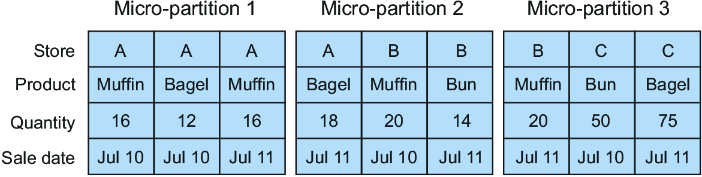
Use the partition diagram with the sample sales rows to see how ordering places store values across partitions and determines which partitions a store filter can skip. section 8.3.1
Clustering matters when queries need pruning but relevant values overlap across many micro-partitions. A clustering key, made from one or more columns or expressions, directs Snowflake to sort and reorganize partition data behind the scenes. Before adding one, inspect clustering information: more constant partitions and lower overlap and depth indicate better clustering. Re-clustering can be expensive for high-cardinality keys, so performance needs should justify it. section 8.4.1
Use micro-partition behavior to guide query and table decisions:
- Select required columns explicitly to allow unused columns to be excluded. section 8.3.1
- Favor filters on dimensions whose values are localized to fewer partitions. section 8.3.1
- Inspect clustering before changing table organization, then use a clustering key when pruning-sensitive queries require better layout. section 8.4.1
- Consider clustering alongside search optimization, query acceleration, and warehouse use when improving large-query performance. section 1.2 section 8.0
