Microsoft Security DevOps is an application for installing, configuring, and running static analysis tools in development workflows. It shifts security left by finding code vulnerabilities, exposed secrets, and infrastructure-as-code (IaC) misconfigurations before deployment. When repositories are onboarded to Defender for Cloud, findings can give security teams dashboard visibility alongside developers’ repository-level results. section 11.4 section 11.4.2
Use it as part of a layered DevSecOps workflow rather than as a complete security control. The application embeds checks in GitHub Actions or Azure DevOps pipelines, while Defender for DevOps connects the resulting findings to cloud security posture management. GitHub and Azure DevOps are the supported source-control platforms described here. section 11.4 section 11.4.1
The application can run analyzers for several code and deployment artifacts:
- Static code analysis, including Python, JavaScript, and Windows or ELF binaries. section 11.4.2
- IaC misconfiguration scanning for ARM, Bicep, Terraform, CloudFormation, Kubernetes, Helm, Dockerfiles, and Kustomize. section 11.4.5
- Secrets and credential scanning in Azure DevOps, including passwords and SQL connection strings in source or configuration files. section 11.4.2 section 11.4.8
- Container-image, Git-repository, and file-system analysis through Trivy. section 11.4.2
Run an IaC-only GitHub scan
Add the Microsoft Security DevOps GitHub Action to a workflow and set categories to IaC. On pushes or pull requests, the workflow runs the IaC analyzers; the workflow can then upload the generated SARIF alerts to GitHub’s Security tab. After repository onboarding, the same results are also visible in Defender for Cloud. section 11.4.4 section 11.4.5
Add checks to an Azure DevOps pipeline
Install the Microsoft Security DevOps Azure DevOps extension, then add the MicrosoftSecurityDevOps@1 task to a pipeline. Set categories to IaC to focus on template misconfigurations, or secrets to detect exposed credentials. Save the YAML change and run the pipeline as part of CI/CD. section 11.4.6 section 11.4.7 section 11.4.8
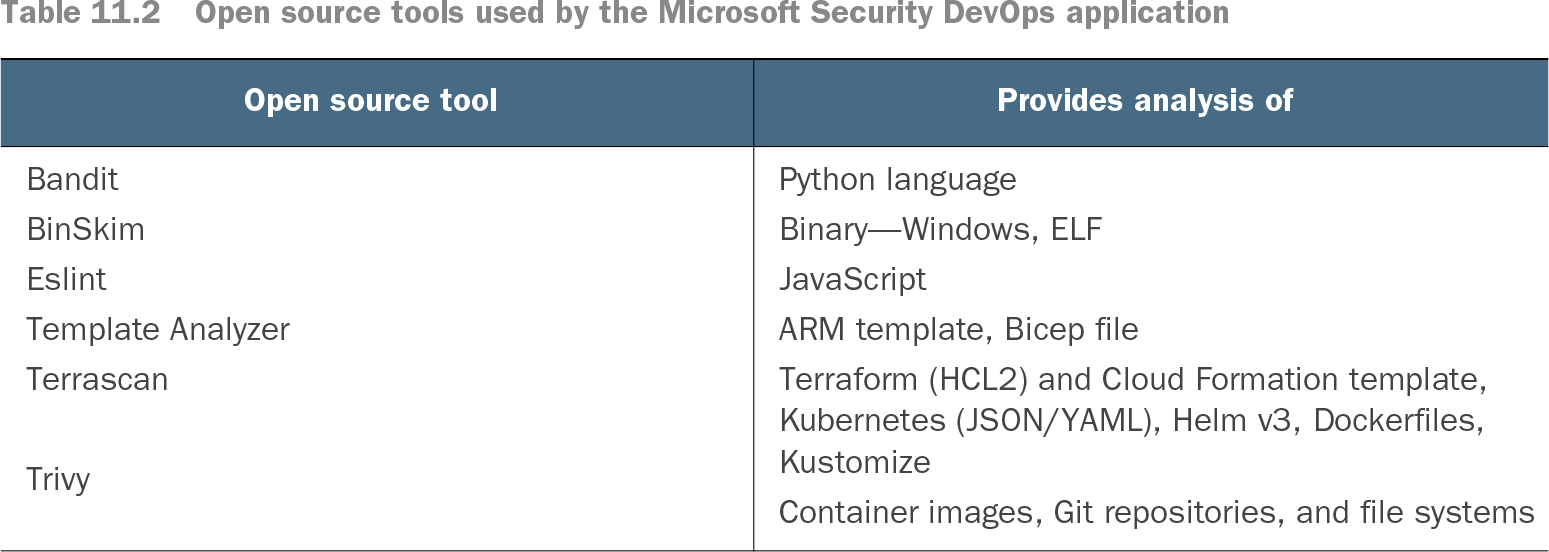
Table 11.2 Open source tools used by the Microsoft Security DevOps application (view table figure)
| Terraform (HCL2) and Cloud Formation template, Kubernetes (JSON/YAML), Helm v3, Dockerfiles, Kustomize |
Browse the analyzer table to match a repository’s languages and deployment artifacts to the tools Microsoft Security DevOps runs. section 11.4.2