The min-width media feature applies CSS when the viewport or output width is at least a specified value. Write it inside a media query, such as @media (min-width: 955px) { }, then place the wider-screen rules inside the braces. section 4.4.1
Use increasing min-width thresholds to add layout changes as more horizontal space becomes available:
- At 550px and wider, right-align the third and later checkout-table columns with :nth-of-type(n+3). section 8.4.1
- At 995px and wider, turn the checkout and summary sections into a flex layout with a 20px gap. section 8.5
- Use flex-grow and flex-basis to influence how the available width is divided between the cart and summary sections. section 8.5
A wide checkout layout
Starting with a .section-container holding the cart and summary sections, apply @media (min-width: 955px) { .section-container { display: flex; gap: 20px; } section.my-cart { flex-grow: 1; } section.summary { flex-basis: 250px; } }. The cards sit side by side when the threshold is reached; at smaller widths, the wide-screen rules do not apply.
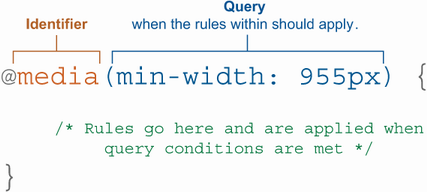
Inspect the media-query breakdown to connect the @media syntax, min-width condition, and rules that activate when the condition matches. section 4.4.1

