A minimal API endpoint handles an HTTP request at a specified path. Use one to expose data or an operation to a client, such as a mobile app or browser-based single-page application. Minimal APIs are a straightforward way to build HTTP APIs that typically return JSON, without first building an HTML interface. section 5.2.2 section 5.1
Match a GET request
For example, `app.MapGet("/person/{name}", (string name) => people.Where(p => p.FirstName.StartsWith(name)));` defines a GET endpoint at `/person/{name}`. Its handler selects people whose first names start with the supplied name. Because GET is for fetching data, this handler does not change server data. section 5.2.2
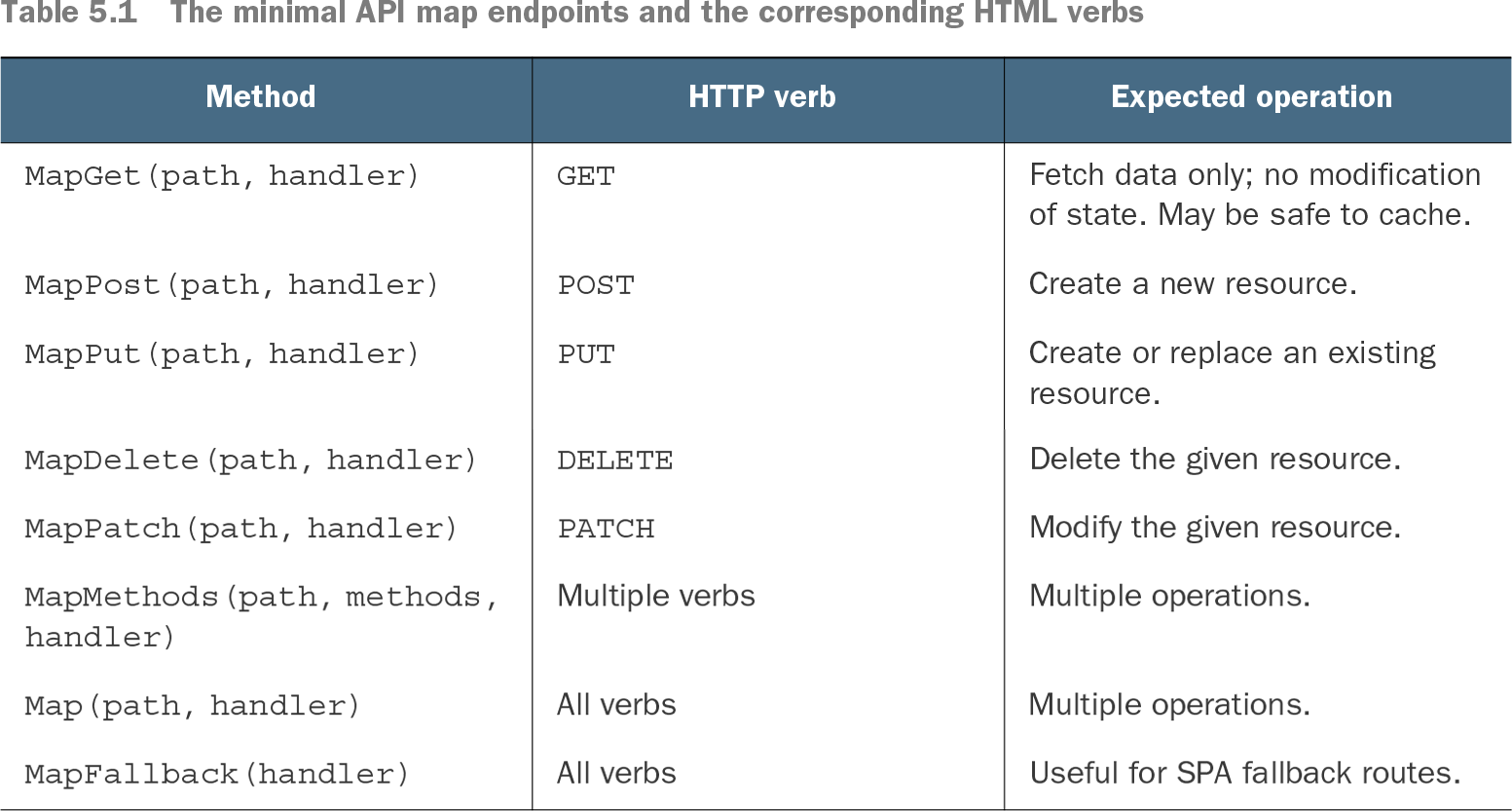
Choose a mapping method that fits the operation. `MapGet()` matches GET requests; `MapPost()` matches POST requests. Use GET to retrieve data, not to send changes to the server. For an API, matching HTTP verbs to their expected purposes makes the interface easier for clients to understand. section 5.2.2
Table 5.1 The minimal API map endpoints and the corresponding HTML verbs (view table figure)
| Fetch data only; no modification of state. May be safe to cache. |
||
Use the mapping table to find the method and expected operation for GET, POST, PUT, DELETE, and PATCH, as well as mappings that accept multiple verbs. section 5.2.2
To try a small application, create an ASP.NET Core Empty project in Visual Studio or run `dotnet new web` with the .NET CLI. The starter example returns “Hello World!” when its HTTP API is called. After creating the project, restore its dependencies, build it, and run it. section 3.2.1 section 3.2
Minimal APIs and web API controllers both build HTTP APIs. Controllers offer built-in content negotiation; minimal APIs do not provide it out of the box. Minimal APIs may be a better fit when performance is especially important, while the choice also depends on filtering needs and existing experience. Endpoint behavior can be unit-tested, though an isolated test does not exercise surrounding framework behavior such as routing and model binding. section 20.6 section 36.2