mlc_llm_compile builds a platform-specific model library from a generated mlc-chat-config.json file. It targets a device such as an NVIDIA GPU and writes the compiled library to a chosen output path, completing the transition from converted model files to deployable inference artifacts. section 11.3
Use the command after model preparation:
- Ensure the model directory contains mlc-chat-config.json, parameter shards, tokenizer files, and related conversion artifacts. section 11.3
- Create an output directory for compiled libraries. section 11.3
- Pass the chat-configuration path, target device, and output library path to mlc_llm compile. section 11.3
- Load the resulting library with MLCEngine for OpenAI-compatible synchronous or streaming chat completions, or serve it through MLC LLM’s REST API. section 11.3 section 11.5
Compiling for CUDA
mlc_llm compile ./dist/RedPajama-INCITE-Instruct-3B-v1-q4f16_1-MLC/mlc-chat-config.json --device cuda -o dist/libs/RedPajama-INCITE-Instruct-3B-v1-q4f16_1-cuda.so section 11.3
Figure 11.3 The end-to-end workflow for MLC LLM, from model conversion to deployment on the supported platforms’ native runtimes
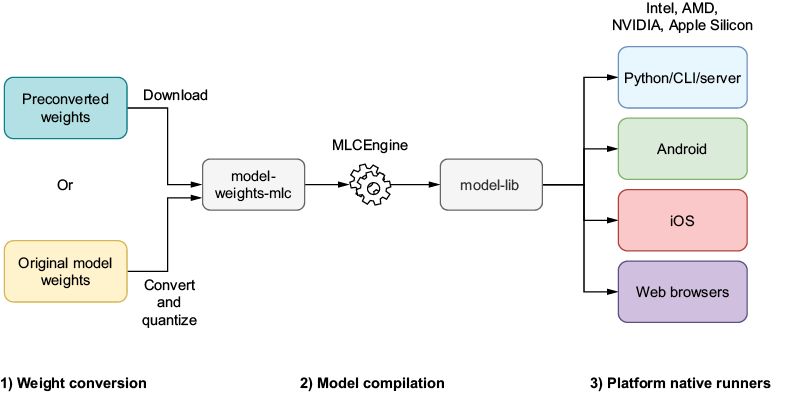
Use the end-to-end workflow to situate compilation between model conversion, configuration generation, and deployment on supported runtimes. section 11.3
