MLflow UI provides an operational view of tracked ML work. A local tracking server exposes experiments, runs, parameters, metrics, datasets, and artifacts for inspection and comparison. section 4.1.2
mlflow ui
[2023-09-22 13:50:58 +0800] [16047] [INFO] Starting gunicorn 21.2.0
[2023-09-22 13:50:58 +0800] [16047] [INFO] Listening at: http://127.0.0.1:5000
Start the local interface with mlflow ui, then open the server at http://localhost:5000. section 4.1.2
Use the UI as the visible layer of an MLflow tracking workflow:
- Set the tracking URI and create an experiment such as income-classifier. section 4.1.2
- Inspect each run through its description, datasets, model parameters, metrics, and artifacts. section 4.1.2
- Review plots, model files, datasets, and other disk-backed outputs under the Artifacts tab. section 4.1.2
- Compare candidate models by querying metrics and viewing the results as charts. section 4.1.3
- Open the Models tab to inspect models registered for reuse and reproduction. section 4.1.3
Selecting a candidate model
Query runs with metrics.roc_auc_score_test > 0.8, inspect the chart, and select the model with the highest test AUC. A random forest can then be registered under a named model entry. section 4.1.3
Figure 4.7 Using the MLflow UI to query runs that have a test AUC score > 0.8. The results are displayed in a chart view.
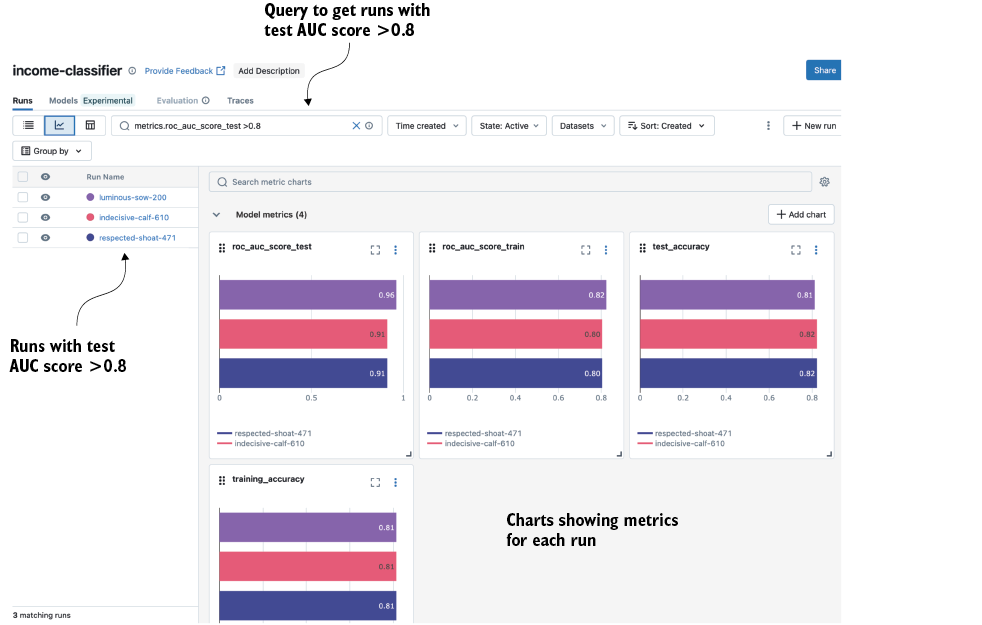
Use the chart view to compare qualifying runs and identify metric differences visually. section 4.1.3
