Use a modulus operation when a value should loop instead of growing without bound. A hue moved 180 degrees to find its complementary color, for example, must return to the start of a 360-degree color wheel after passing 360. CSS `mod()` performs that wrap directly: `mod(225deg + 180deg, 360deg)` produces `45deg`. section 3.2.4
`mod(dividend, divisor)` returns the remainder after division, with a result that takes the sign of the divisor. With a positive divisor, values wrap into a positive cycle: `5 mod 5` is `0`, `6 mod 5` is `1`, and `-1 mod 5` is `4`. Picture positions 0 through 4 arranged in a circle: moving backward once from 0 lands on 4 rather than outside the range. section 2.5.1 section 3.2.4
Figure 2.1 Modulo logic is like moving around a circle.
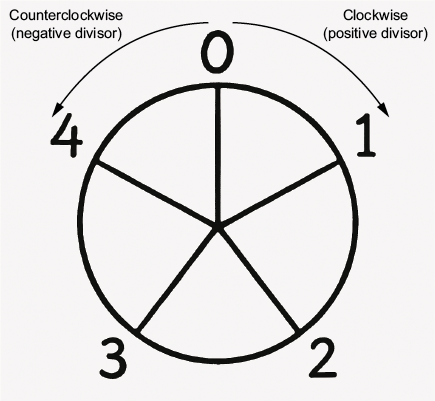
A circular sequence makes wrapping visible: passing the final item returns to the first, while stepping backward from zero reaches the final item. section 2.5.1
This behavior differs from JavaScript’s `%` remainder operator. JavaScript returns a negative remainder when the dividend is negative, so `-1 % 5` does not provide the wrapped index needed for a backward-moving carousel. A small utility can produce true modulo behavior instead: `((dividend % divisor) + divisor) % divisor`. section 2.5.1 section 2.5.2
For cyclic interface values, use `mod()` to keep calculations within the cycle:
- Wrap a slider or carousel index so forward and backward controls remain in the image array’s valid range. section 2.5.2 section 3.7
- Calculate a complementary HSL hue by adding `180deg` and dividing the result into the 360-degree color cycle. section 3.2.4
- Choose the divisor’s sign deliberately when direction matters, because the result follows that sign. section 2.5.1 section 3.2.4
Complementary color in CSS
Store the starting hue in a custom property, add half a turn, and wrap it with `mod()`. The original hue is `225deg`; the complement becomes `45deg`, not `405deg`. `:root {\n --base-hue: 225deg;\n --complement-hue: mod(calc(var(--base-hue) + 180deg), 360deg);\n --saturation: 60%;\n --lightness: 50%;\n}\n\n.original { background-color: hsl(var(--base-hue) var(--saturation) var(--lightness)); }\n.complement { background-color: hsl(var(--complement-hue) var(--saturation) var(--lightness)); }` section 3.2.4
Listing 3.11 Calculating a complentary color using mod()
:root {
    --base-hue: 225deg;    #1
    --complement-hue: mod(calc(var(--base-hue) + 180deg), 360deg);
    --saturation: 60%;
    --lightness: 50%;
}
.original {
    background-color: hsl(var(--base-hue)
                          var(--saturation)
                          var(--lightness));
}
.complement {
    background-color: hsl(var(--complement-hue)
                          var(--saturation)
                          var(--lightness));
}
The listing connects the 360-degree calculation to two rendered HSL colors, using custom properties for the base and wrapped complementary hue. section 3.2.4
`mod()` is therefore the CSS choice for cyclic values such as color wheels, sliders, and carousels. Keep `rem()` distinct: it preserves the sign of the dividend, whereas `mod()` takes the sign of the divisor. That difference determines whether a negative input wraps to the expected position in a cycle. section 3.7 section 3.2.4
