Model-View-ViewModel (MVVM) is a UI architecture pattern that separates an application into a View, a ViewModel, and a Model. The View displays the interface; the ViewModel holds the View’s state and presentational logic; and the Model represents the problem domain through entities, services, and business logic. This separation keeps UI layout and behavior apart from application rules and data access. section 9.3 section 1.5
Figure 1.9 The MVVM pattern. The Model is the representation of the problem your app solves and consists of entities and services. The ViewModel represents the state of your View and contains logic for updating the Model in response to changes in the View (user input) and updating the View in response to changes in the Model. The View contains logic for displaying the app onscreen, including definitions of the UI and any logic for changing how the UI is rendered.
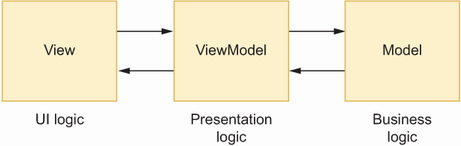
Follow the two-way flow: user input originates in the View, the ViewModel updates the Model, and Model results update the state displayed by the View. section 1.5
Assign responsibilities deliberately:
- Put XAML layout, control definitions, rendering, animations, and display behavior in the View. A switch’s color belongs here. section 9.3 section 9.3.3
- Put bindable state and logic responding to user actions in the ViewModel. A switch’s on/off value belongs here, not its visual styling. section 9.3.3
- Put domain objects, processing rules, database queries, API calls, and services in the Model. section 9.3
- Expose ViewModel properties for controls to bind to and commands for controls to invoke, rather than placing application work in code-behind event handlers. section 9.3.5 section 9.7
Refactor a to-do screen
A to-do page can bind its entry and date picker to NewTodoTitle and NewTodoDue, its list to an ObservableCollection of items, and buttons or checkboxes to commands. MainViewModel loads items, adds a new item through a database, and completes a selected item. The page’s code-behind need only set its binding context. Commands accept a to-do item parameter where a simple CheckedChanged event handler cannot identify the affected item. section 9.1
When ViewModel state changes, it raises property-change notifications so bound controls refresh. In a larger input workflow, a search control can invoke a ViewModel command, results can populate a bound collection, selected data and a count can remain in ViewModel properties, and a submit command can call an inventory service. This leaves the screen focused on interaction while services handle the business operation. section 9.5 section 9.7
MVVM is most useful when an app’s screens and logic are substantial enough that UI code would otherwise manage state and business work directly. Looser coupling makes parts easier to change, isolate, and test; ViewModel logic can be unit tested because it is code outside the View. For a trivial one-screen app, the pattern may add unnecessary structure. MVU is an alternative for teams that prefer an immutable, C#-defined UI. section 9.3.5 section 9.4
