A monitor is a Java synchronization mechanism associated with an object. Only one thread at a time can execute synchronized code guarded by that object; another thread trying to enter must wait until the monitor is available. Code outside the synchronized blocks can still run concurrently. section 9.1
A shared list
A producer and consumer both synchronize on the same ArrayList instance. The producer adds values while the consumer removes them, so only one can change the list inside its synchronized block at a time. This simplified example illustrates the mechanism, not a ready-made production design. section 9.1
Monitor contention can make execution time much longer than CPU time. Sampling can reveal that a method is waiting, but may not reveal what is blocking it. Lock profiling identifies the monitor and the threads involved. section 9.2
To investigate contention in VisualVM:
- Start lock monitoring with the Locks button in the Profiler tab, then expand a thread to inspect the monitors that affected it. section 9.2
- Compare monitor object references across threads to identify a shared instance, and inspect which threads blocked one another and how often. section 9.2
Figure 9.8 The profiling results give us a good understanding of what creates locks and what is affected by them. We see that there’s only one monitor the producer thread works with. Also, the producer thread was blocked by the consumer thread 3,698 times using the monitor. Using the same monitor instance, the producer blocked the consumer for a similar number of times: 3,699.
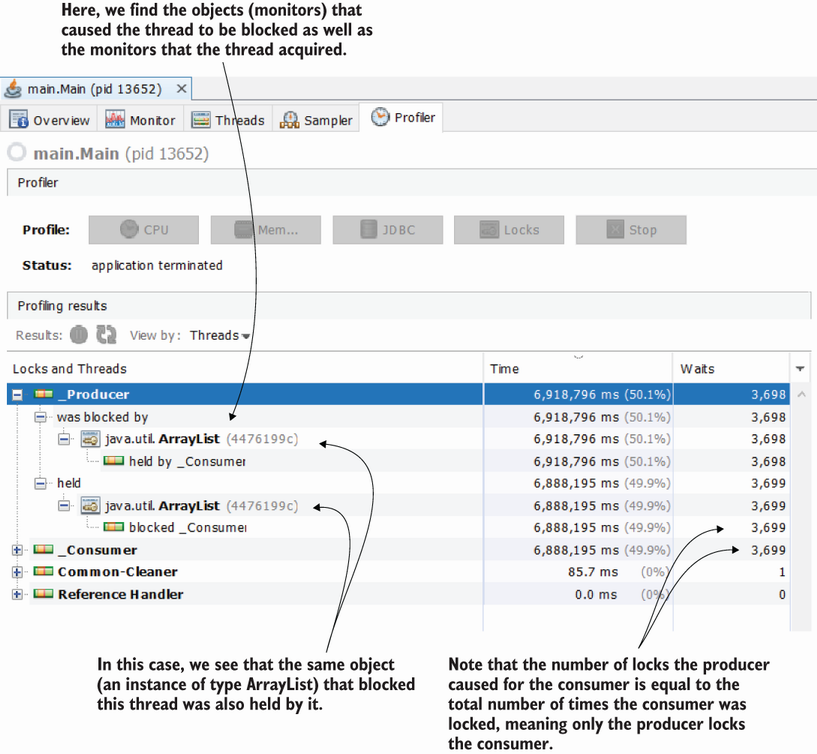
The producer’s profile identifies the shared ArrayList monitor and shows blocking in both directions. section 9.2
Being blocked at the entrance to synchronized code differs from explicitly waiting for a notification. In a producer-consumer example, a consumer calls wait() on the shared list when it is empty; the producer calls notifyAll() after adding a value. The corresponding producer can wait when the list is full. Waiting can change performance: in this example, the revised execution was slower despite less frequent locking. section 9.3
Figure 9.14 Locked threads versus waiting threads. A locked thread is blocked at the entrance of a synchronized block. The monitor won’t allow a thread to enter a synchronized block while another thread actively runs inside the block. A waiting thread is a thread that the monitor has explicitly set to the blocked state. The monitor can make any thread inside the synchronized block it manages wait. The waiting thread can continue its execution only after the monitor explicitly tells it that it can proceed with its execution.
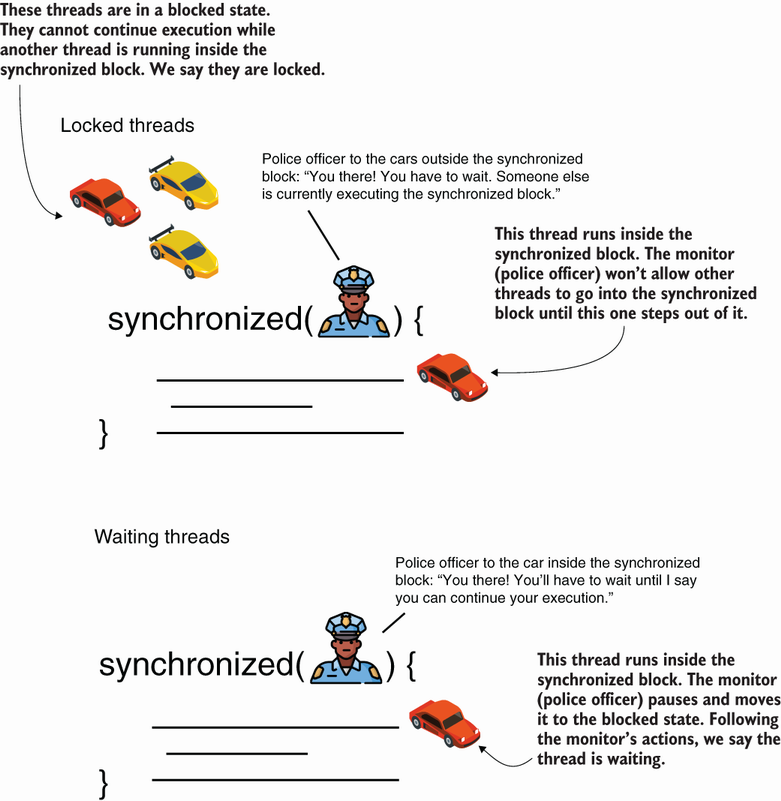
The diagram contrasts a thread blocked at a synchronized block with a thread explicitly waiting for notification. section 9.3
Multiple monitors can also create a deadlock. If two threads nest synchronized blocks in opposite orders, each can hold one monitor while waiting for the other, leaving both stuck. section 10.1