liveBook · Manning

Mount target

As explained in Amazon Web Services in Action, Third Edition: An in-depth guide to AWS

An EFS mount target is a network endpoint that enables resources in a virtual network to mount an EFS filesystem.

An EFS mount target is a network endpoint that makes an EFS filesystem accessible to EC2 instances through NFSv4.1. The filesystem stores the data; the mount target provides the path into it from a subnet. section 9.0

A practical mount-target design includes:

  • Create a mount target for the EFS filesystem in a subnet where client EC2 instances run. section 9.0
  • Attach a security group that permits inbound TCP traffic on port 2049 from the EC2 client security group. section 9.2
  • Create mount targets in multiple subnets and availability zones to improve fault tolerance and availability. section 2.2.4 section 9.7
  • Manage the resource with CloudFormation by specifying the filesystem, subnet, and security groups. section 9.2

Shared home directories

Mount EFS under /home on multiple EC2 instances. Users then see shared home directories regardless of which machine they access, instead of receiving separate local directories on each instance. section 9.0
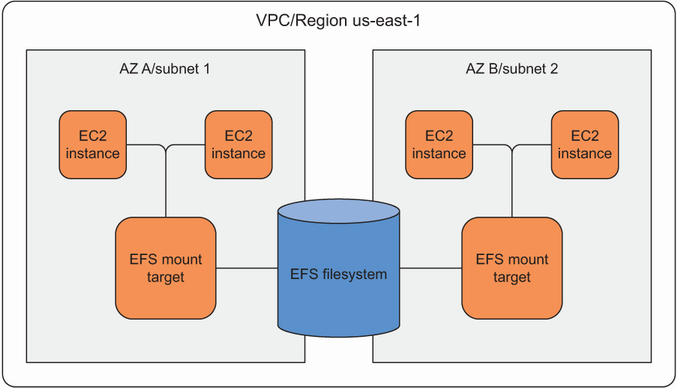
Figure 9.2 Mount targets provide an endpoint for EC2 instances to mount the filesystem in a subnet.

Use the diagram to trace how mount targets provide subnet endpoints for EC2 instances to reach one EFS filesystem. section 9.0

Mount targets are protected network endpoints rather than storage themselves. EFS data is replicated across multiple data centers, while mount targets remain tied to availability zones; using at least two supports high availability. section 9.7

How Amazon Web Services in Action, Third Edition: An in-depth guide to AWS covers it

How deep it goes
Defines the endpoint, subnet, protocol, security-group, and availability requirements, then demonstrates CloudFormation configuration.
Examples
Uses shared WordPress files, shared Linux home directories, and paired mount targets defined with CloudFormation.
What it assumes
Assumes basic familiarity with EFS, EC2, subnets, security groups, and Linux mounting while introducing their shared-storage relationship.
What you can do after
Build it from scratch by creating EFS mount targets, securing NFS traffic, and connecting multiple client instances.
How it connects
Links EFS with NFSv4.1, EC2, subnets, availability zones, security groups, and CloudFormation.

Related concepts

This explainer was generated by Manning's knowledge graph from the text of Amazon Web Services in Action, Third Edition: An in-depth guide to AWS. The section links point to the parts of the book it draws on.