A NumPy array holds multidimensional data for numerical processing. Its shape describes the dimensions; its dtype describes the elements. For a grayscale image, `np.array(image)` produces a two-dimensional array: a 182 × 45 image has shape `(45, 182)`—rows first, then columns—and `uint8` pixels. Check `shape`, `dtype`, and `nbytes` before changing how the data is processed. section 4.0 section 4.1.1
Inspect an image array
After loading a grayscale image with Pillow, run `image_arr = np.array(image)` and inspect `image_arr.shape`, `image_arr.dtype`, and `image_arr.nbytes`. For the 182 × 45 example, these report `(45, 182)`, `uint8`, and 8,190 bytes of array data. section 4.1.1
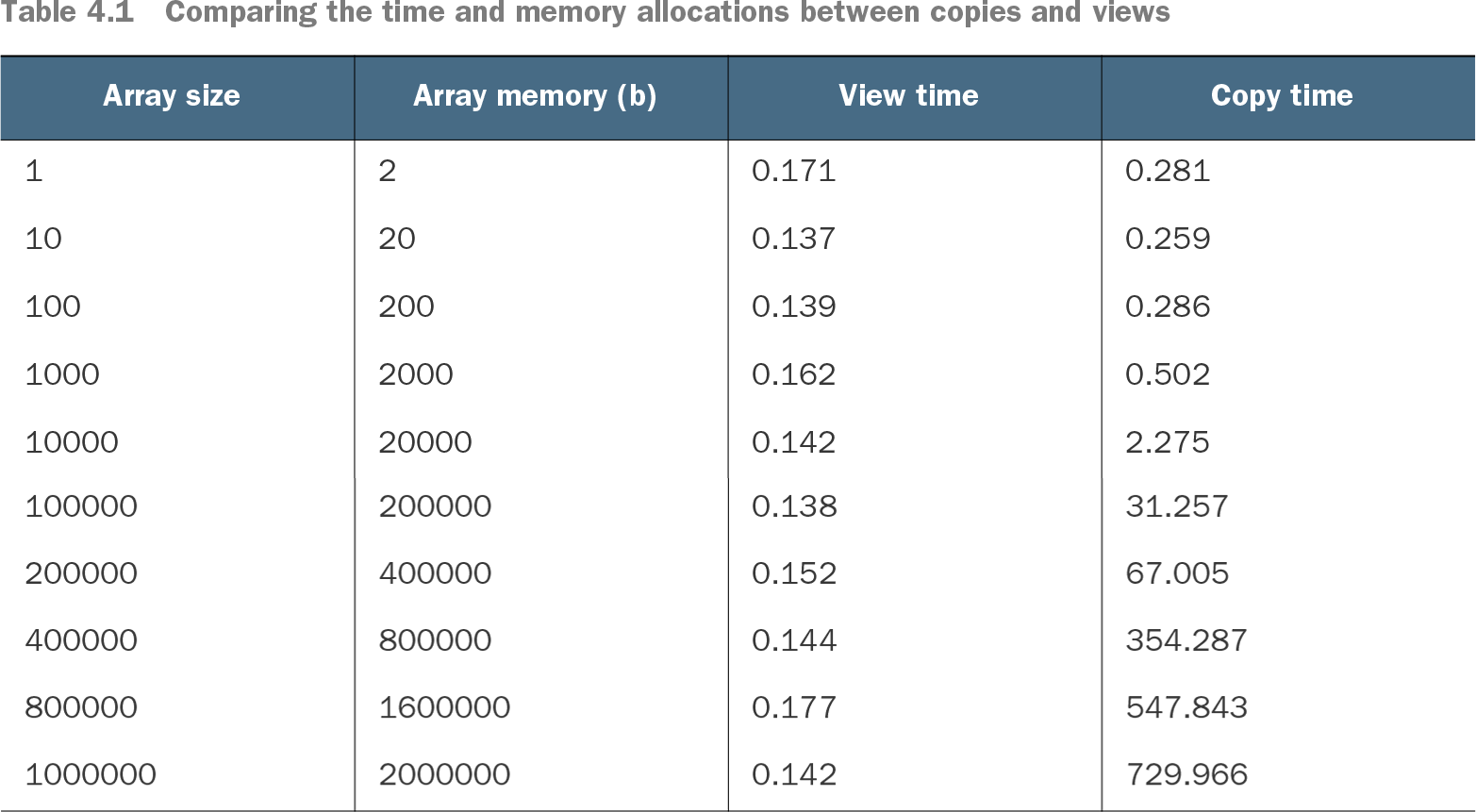
An operation need not allocate new pixel data. `np.flipud(image_arr)` can create a view: another interpretation of the same memory. `np.flipud(image_arr).copy()` instead owns a separate copy. Changing the original image then changes what the view displays, but not the copy. Use `np.shares_memory` to check which result shares storage; prefer a copy when later changes must remain independent. section 4.1.1
Table 4.1 Comparing the time and memory allocations between copies and views (view table figure)
Compare view and copy timings as array size grows: view creation stays nearly flat in this benchmark, while copying becomes much more costly. section 4.1.1
Arrays also expose performance choices across libraries. A pandas series can yield its underlying array through `to_numpy()`; a vectorized tip calculation took 11 ms with NumPy arrays versus 35 ms with pandas objects in the reported run. Request `to_numpy(copy=True)` when changes must not affect the original, accepting the added time and memory cost. section 7.3.1
A typed NumPy array is not automatically cheap to index inside a Cython loop. Profiling an image operation found that `image[row, col]` still invoked Python machinery. For large arrays, disk representation matters too: Blosc wrote highly compressible zero and tiled arrays faster and smaller than NumPy’s uncompressed format in the reported tests, but was slightly slower for random data. Measure the operation and the data, not just the array API. section 5.3.2 section 6.2.1