Mutate is a Graph Data Science execution mode that writes an algorithm’s results into a projected in-memory graph. It requires a named graph in the graph catalog and is useful when a later algorithm should consume those results. section 5.2
Choose mutate when analysis needs to continue inside the same projected graph:
- Use stream to return records without storing results. section 5.2
- Use stats to return summary statistics without storing results. section 5.2
- Use mutate to add algorithm results to the projected in-memory graph. section 5.2
- Use write to store algorithm results in the Neo4j database graph. section 5.2
Adding betweenness centrality
After projecting the follower network and its existing node features, run `CALL gds.betweenness.mutate('knnExample', {mutateProperty:'betweenness'})`. The computed betweenness values become a node property in the projected graph and can support subsequent analysis. section 8.1.2
Building a similarity network
Run `gds.knn.mutate` with `mutateRelationshipType:'SIMILAR'`, `mutateProperty:'score'`, and `topK:65` to add qualifying similarity relationships and scores to the projected graph before community detection. section 8.2.2
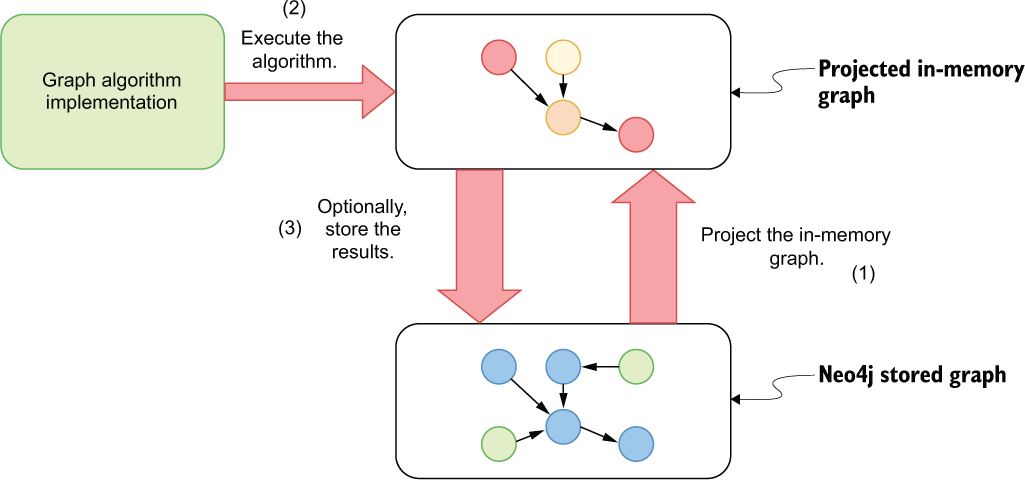
Use the Graph Data Science workflow to see where projection, algorithm execution, mutation, and later analysis fit together. section 5.2
