A NAT translation table records mappings between inside local addresses and inside global addresses, then associates active outside communication sessions with those mappings. Static mappings remain permanently; session-specific entries appear when traffic flows and expire after inactivity. section 9.3.1 section 9.4
Read the table by separating permanent mappings from session entries:
- Inside global identifies the translated address; inside local identifies the original inside address. section 9.3.1 section 9.4
- Outside local and outside global identify the outside host addresses; without destination NAT, these values are identical. section 9.4
- A row with dashes in the protocol and outside columns represents the address mapping itself; protocol and port values identify a communication session. section 9.3.1
- Dynamic session rows track individual TCP or UDP conversations and disappear after inactivity or after clear ip nat translation * removes dynamic entries. section 9.3.1 section 9.4
Verifying static and active entries
show ip nat translations displays permanent mappings such as 192.0.2.1 to 10.0.0.11. After the inside host accesses an HTTPS server, an additional row can show tcp 192.0.2.1:54568, 10.0.0.11:54568, and the outside server on port 443. section 9.3.1
Figure 9.6 Static NAT. Inside local addresses 10.0.0.11 and 10.0.0.12 are statically mapped to inside global addresses 192.0.2.1 and 192.0.2.2, respectively.
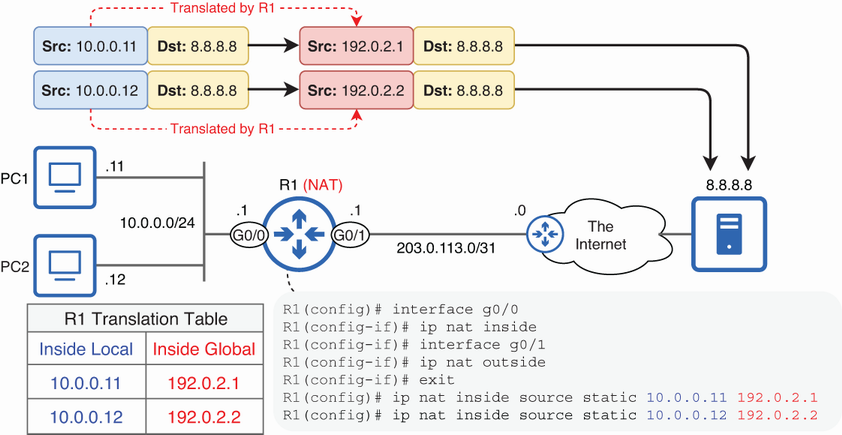
Use the topology figure to follow inside local addresses as they map to inside global addresses. section 9.3.1
