A natural language interface lets people ask for what they need in ordinary language instead of navigating fixed controls. In an AI product, conversation can make a large body of data easier to explore—but flexibility does not guarantee a usable or reliable experience. section 3.3.1
A financial dashboard becomes a conversation
Users of a crowded analytics dashboard can ask questions rather than hunt through filters. A prototype may still fail on real queries even if its model performs well on test data. User interviews and a test suite of real question–answer pairs expose the mismatch; narrowing the supported questions and guiding users toward them makes the interface more realistic than promising unrestricted chat. section 1.1
Choose the interaction boundary around the task, not around the appeal of chat:
- Use conversation when people benefit from flexible exploration of knowledge or data. section 3.3.1
- Prefer graphical controls, or combine them with conversation, when users struggle to phrase effective requests or need familiar actions. section 3.3.1
- Decide how much the system may do automatically and where a human should retain control. section 3.3
Figure 3.9 Vercel, a tool for code generation, has a hybrid interface. The user converses with the AI on the code, but common actions such as Preview, Deploy, and Console can be accessed via familiar graphical elements.
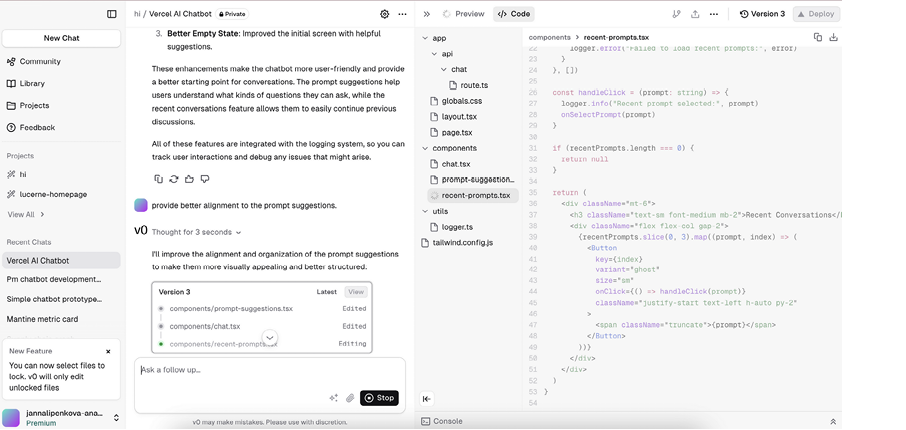
A hybrid code-generation interface pairs conversation about code with graphical controls for common actions, showing that natural language need not carry every interaction. section 3.3.1
Natural language can also be the boundary between a language-model agent and its tools. That flexibility introduces a different failure mode: malformed output, invented tool calls, or incorrectly specified functions can break the next step of a workflow. Treat the interface as fallible, not as a guarantee that the agent understood or acted correctly. section 9.3.1
For users, design for uncertain answers as well as uncertain requests. Test prototypes against realistic failures, show when AI is processing information, and let people modify or reject outputs. Continue collecting feedback after launch: successful interaction depends on user trust and task completion, not just model performance. section 10.0 section 10.4





