Navigation helps visitors understand a site, move to the content they want, and return home without getting lost. A clear navigation system begins with a logical site hierarchy: broad parent pages hold the main topics, while child pages provide more specific, supporting information. Planning that structure before adding lots of content keeps the site focused, cohesive, and easier to expand later. section 3.3 section 1.6.2 section 3.7
Build a useful menu in this order:
- Define the site’s goal and main visitor paths before deciding which pages belong in the menu. section 3.7
- List the few broad topics that deserve parent pages, then place narrower topics beneath them as child pages. section 3.3.5
- Keep labels brief, familiar, and clear; do not repeat the site title in every menu item. section 3.3.5
- Put Home at the left of the menu and make the site title or logo return visitors to the home page. section 3.3.5
- Expose child pages through submenus so visitors can reach specific content with few clicks without facing an oversized menu. section 3.3.5 section 3.7
- Watch people try the site before publishing, noting confusing labels, unexpected paths, and whether they reach the intended call to action. section 3.3.5
Turning recipe topics into a menu
A recipe site might use parent pages for major cuisines or recipe groups and add empty child-page placeholders for narrower choices such as Tex Mex, Spicy Thai, Chinese Cuisine, French Fare, Italian, Ingredients, Gourmet, Greek, and Blog. Create the page titles first, assign child pages to their parents, then add the pages to the menu and adjust their order or names as needed. section 3.6.1
AI can help draft a first hierarchy by comparing successful sites in the same niche and combining their common parent and child topics. Treat that output as a starting point: set the assignment, judge the suggestions, ask for revisions, and keep only the organization that serves the site’s own purpose. section 3.3.2
Figure 3.16 WordPress has identified your home (front) and blog pages and indented the child pages.
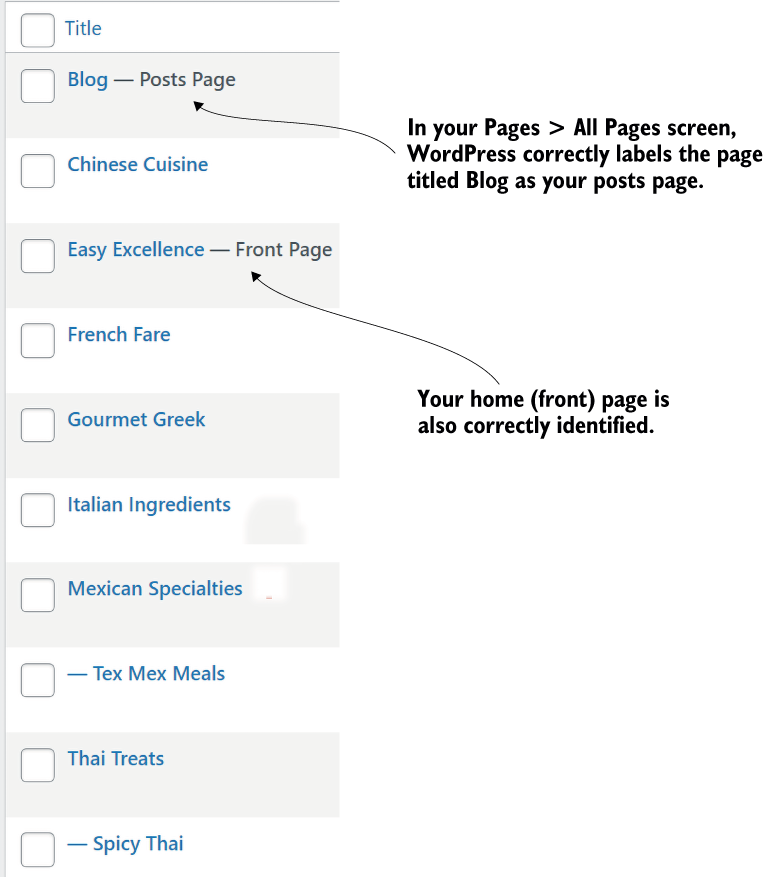
Use this view to check that WordPress has identified the home and blog pages and visually indented child pages beneath their parents. section 3.6.1
Navigation needs refinement after the first setup. Scan the whole site for unclear navigation labels and inconsistent design, but do not rely on pasted text or screenshots alone to reveal large-scale navigation and organization problems. A site-wide review, visitor observation, analytics plugins, or an AI scan can reveal where the structure needs work. section 6.9 section 11.2.2 section 12.5



