liveBook · Manning

Navigation label

As explained in WordPress Power Toolkit: Harness AI to build next-level websites

A navigation label is the text displayed for a menu item in a website's navigation interface.

A navigation label is the text displayed for a menu item. Short, familiar labels help visitors scan the menu quickly and recognize where each link leads. section 3.6.2 section 6.9

Refine navigation labels while completing a website menu:

  • Open each menu item's settings by clicking its black arrow icon. section 3.6.2
  • Replace long or unusual names with brief labels that visitors will recognize. section 3.6.2 section 6.9
  • Use Home for the first item when it links to the site's home page; place it at the far left. section 3.6.2
  • Update the menu, view it on the frontend, and check every link for a real target. section 3.6.2

Recipe menu

A recipe site changes its labels to Home, Chinese, French, Greek, Italian, Mexican, and Thai. Mexican and Thai can contain child pages while remaining concise parent labels. section 3.6.2

Figure 3.22 The finished menu
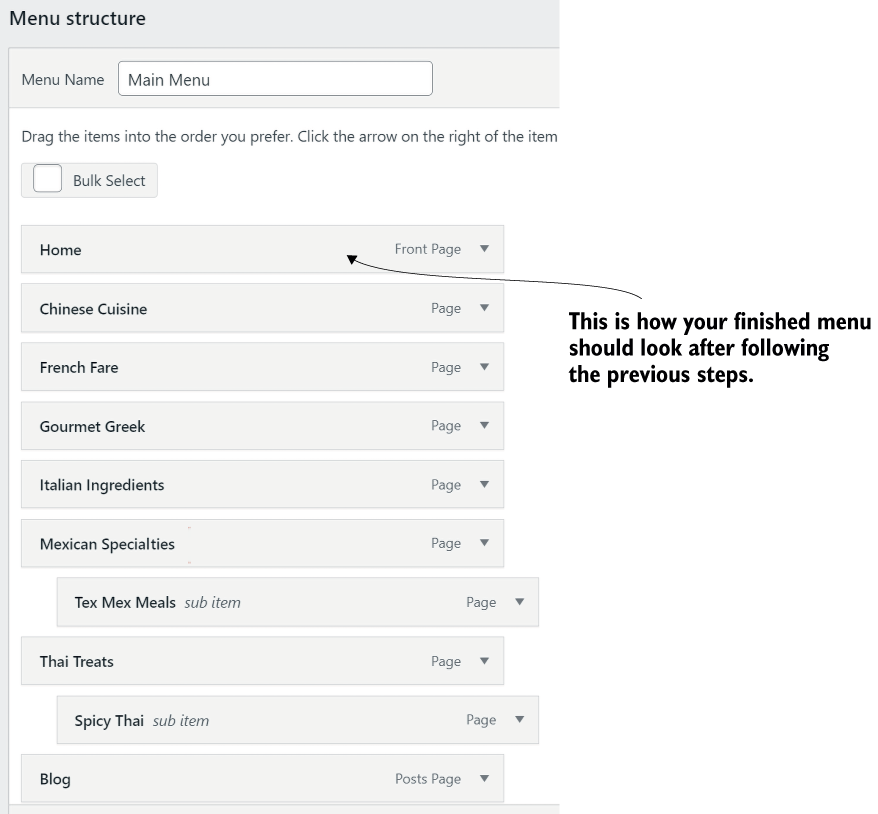
Use the finished-menu view to compare label brevity, ordering, and submenu structure. section 3.6.2

How WordPress Power Toolkit: Harness AI to build next-level websites covers it

How deep it goes
Explains label editing, naming conventions, frontend checking, and recognizability, without detailing broader information architecture.
Examples
Uses a recipe menu with Home, cuisine labels, Mexican and Thai submenus, and a frontend finished-menu view.
What it assumes
Assumes a website menu with page links and teaches the navigation-label term while demonstrating its editing workflow.
What you can do after
Operate WordPress menu settings to rename items, organize child pages, publish changes, and manually check links.
How it connects
Connects navigation labels with menus, child pages, submenus, frontend verification, and website design.

Related concepts

This explainer was generated by Manning's knowledge graph from the text of WordPress Power Toolkit: Harness AI to build next-level websites. The section links point to the parts of the book it draws on.