The Nintendo Entertainment System (NES) is Nintendo’s North American and Canadian version of the Famicom, released in 1985. Its 8-bit hardware remains a practical target for creating new retro games through modern hardware emulation. section 1.0
An NES game runs directly on the console hardware rather than on a built-in operating system. The programmer initializes the machine, runs the game loop, reads controllers, updates game state, and coordinates graphics and sound. section 1.5.1 section 1.6
Figure 1.4 NES architecture
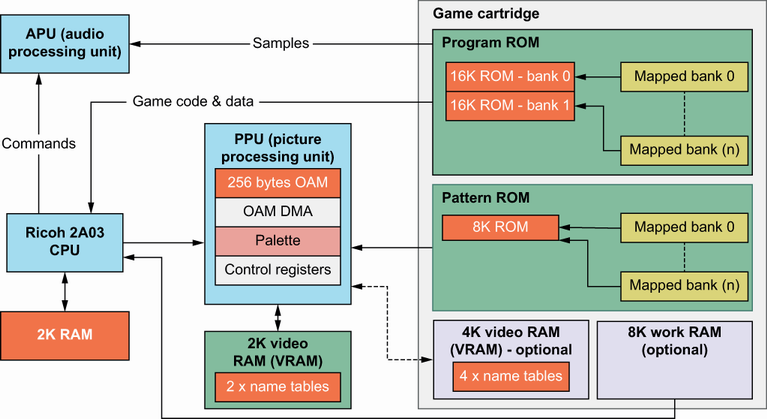
The system centers on a Ricoh 2A03 CPU, a PPU for video, an APU for audio, and a cartridge that supplies program, graphics, and optional expansion hardware. section 1.2
Key platform constraints shape how an NES game is built:
- The mostly 6502-compatible Ricoh 2A03 CPU has 2K of RAM. section 1.2
- The PPU uses its own VRAM and tile and sprite patterns from an 8K cartridge area; cartridge hardware can provide fixed, bank-switched, or writable pattern storage. section 1.2
- The CPU cannot directly access VRAM; it sends updates through PPU control ports. section 1.5.4
- Screen changes are normally made during vBlank, when the PPU raises a non-maskable interrupt after drawing a frame. section 1.5.4
- The APU produces music and sound effects from commands issued by the CPU. section 1.2
A small shoot-em-up
A space-based shoot-em-up provides a concrete path through NES development: learn 6502 assembly and game structure, then add background and moving graphics, controller input, collision detection, scorekeeping, sound effects, and music. The same foundations support platformers, adventure games, and scrolling games. section 1.1
For an intro screen, load tile and sprite patterns into video memory, draw the screen, then loop while waiting for controller input. That loop can animate objects, play music, show scores, or move through menus before play begins. section 1.5.2
Working within limited processing power and memory exposes game-programming mechanisms that larger 2D and 3D platforms can hide. The constraints also make the platform suitable for individual developers or small teams and relevant to other limited devices. section 1.4
