The Cisco IOS no shutdown command removes the shutdown state from an interface and enables it. Router interfaces are disabled by default, so an interface needs this command before it can forward traffic. section 7.3.2 section 7.4
Use the command from interface configuration mode:
- Enter interface configuration mode with interface interface-name. section 7.3.2
- Configure the interface address when needed with ip address ip-address netmask. section 7.3.2
- Enter no shutdown to remove the default shutdown state and enable the interface. section 7.3.2
- Verify the result with show ip interface brief; a working interface appears with Status and Protocol both up. section 7.3.2
Enable R1’s G0/0 interface
R1(config)# interface gigabitethernet0/0 R1(config-if)# ip address 192.168.1.1 255.255.255.0 R1(config-if)# no shutdown %LINK-3-UPDOWN: Interface GigabitEthernet0/0, changed state to up %LINEPROTO-5-UPDOWN: Line protocol on Interface GigabitEthernet0/0, changed state to up The messages indicate physical and Layer 2 protocol operation. Verification should show G0/0 as up/up with address 192.168.1.1.
Figure 7.10 How to configure IP addresses and enable router interfaces. R1 is connected to two LANs: 192.168.1.1/24 (G0/0) and 192.168.2.1/24 (G0/1).
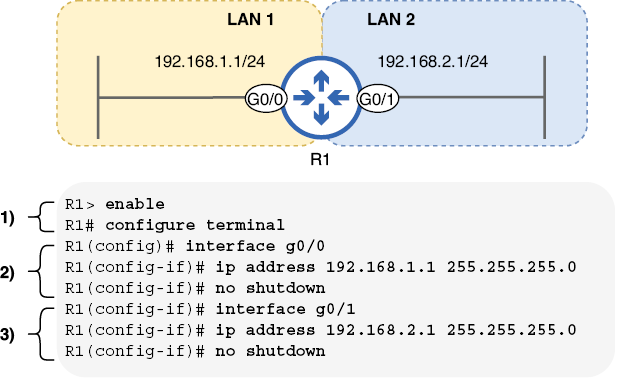
Shows R1 connecting two LANs through interfaces that receive IPv4 addresses and must be enabled before forwarding traffic. section 7.3.2
Do not apply no shutdown automatically to every switch port: router interfaces are disabled by default, whereas switch interfaces are enabled by default. Unused switch ports are commonly disabled with shutdown as a security practice. section 8.1
