Node affinity lets the Kubernetes scheduler express required or preferred node placement through node labels. Unlike a simple node selector, it can prefer labeled nodes while still allowing scheduling elsewhere when the preferred nodes are unavailable. section 4.1.2 section 4.3
Choose the rule type according to the placement guarantee required:
- Use requiredDuringSchedulingIgnoredDuringExecution for a hard rule; the scheduler cannot place the pod unless the node-label requirement is satisfied. section 4.1.2 section 4.3
- Use preferredDuringSchedulingIgnoredDuringExecution for a soft preference; the scheduler may choose another node when no matching node is available. section 4.1.2 section 4.3
- Assign labels to nodes, then use affinity expressions in the pod YAML to influence placement in a changing cluster. section 4.1.2 section 9.3.3
Create and verify an affinity pod
Generate a starter manifest with kubectl run affinity --image nginx --dry-run=client -o yaml > affinity.yaml. Add affinity.nodeAffinity and the requiredDuringSchedulingIgnoredDuringExecution or preferredDuringSchedulingIgnoredDuringExecution rule beneath spec, then apply it with kubectl apply -f affinity.yaml. Verify placement using kubectl get po -o wide; the resulting output shows the pod's assigned node. section 4.1.2
Figure 4.8 Affinity prefers the pod be scheduled to a node with the label SSD but will schedule to node LINUX if none exist.
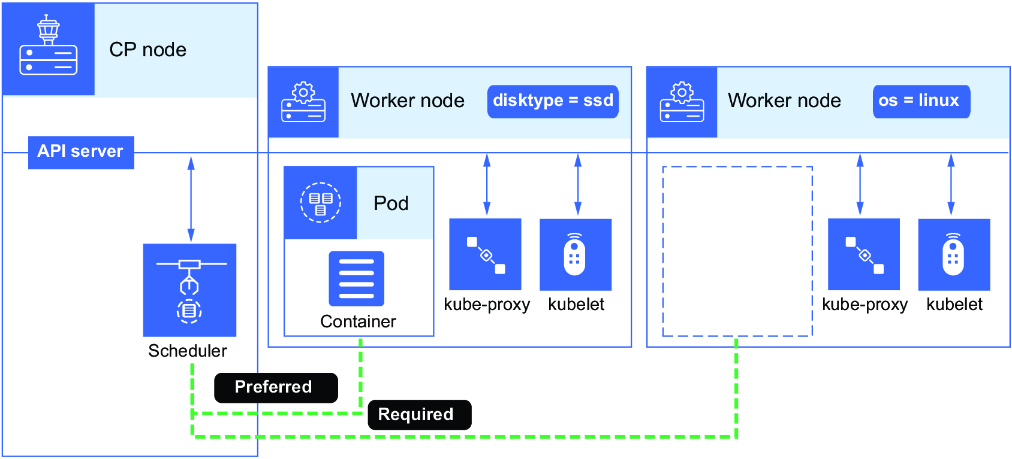
Visualizes preferred placement on a labeled SSD node with fallback scheduling to another node. section 4.1.2





