An object is a unit of stored data containing three parts: the content itself, metadata describing it, and a globally unique identifier called its key. The key lets distributed systems address the object across devices and machines. section 7.1
Objects support practical storage operations:
- Store images, documents, executables, binaries, JSON files, backups, and user uploads. section 7.2
- Attach metadata such as modification date, size, owner, and content type; retrieve metadata without downloading content. section 7.1
- Organize objects in S3 buckets and access them through HTTPS using the Management Console, AWS CLI, SDKs, or third-party tools. section 7.2
- Avoid local server storage by placing objects in S3, supporting stateless-server designs; account for storage, request, and data-transfer charges. section 7.9
Backing up a folder to S3
Create a globally unique bucket, synchronize a local folder into its backup prefix with `aws s3 sync`, and restore it with `aws s3 cp --recursive`. Enable versioning when retaining earlier object versions matters. section 7.3
Figure 7.1 Objects stored in an object store have three parts: a unique ID, metadata describing the content, and the content itself (such as an image).
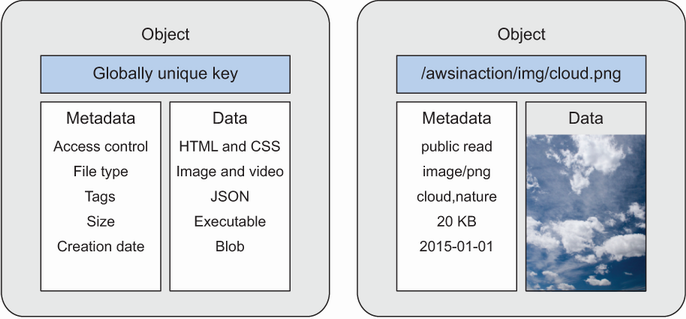
Use the diagram to distinguish an object's unique key, descriptive metadata, and stored content. section 7.1
