An object identifier (OID) uniquely identifies a variable in an SNMP Management Information Base (MIB). Its numeric components form a hierarchical, tree-like path, allowing an SNMP manager to request a specific value from a managed device. section 6.1.2
Use OIDs in SNMP operations as follows:
- Get retrieves the value associated with one or more specified OIDs. section 6.2.1
- GetNext returns the next OID in the tree and its value, enabling the NMS to discover available information by walking the tree. section 6.2.1
- GetBulk retrieves a range of OIDs efficiently and was introduced in SNMPv2. section 6.2.1
- SNMP applications translate lengthy numeric OIDs into descriptive names, while vendor-specific OIDs may require importing the vendor’s MIB file into the NMS. section 6.1.2
Interface status query
The OID 1.3.6.1.2.1.2.2.1.8 identifies interface operational status. An SNMP manager can issue a Get for this OID to learn whether a particular interface is operational. A vendor-specific OID such as 1.3.6.1.4.1.9.9.109.1.1.1.1.4 may appear in an application as “CPU Utilization.” section 6.1.2
Figure 6.6 A small segment of the SNMP OID hierarchy. 1.3.6.1.2.1.2.2.1.8 is the OID of the ifOperStatus variable.
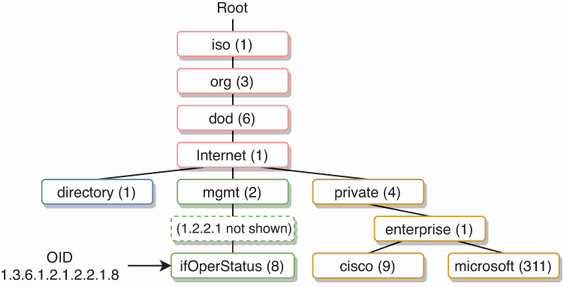
Use the OID hierarchy diagram to trace how each numeric component identifies a branch and locate the ifOperStatus variable. section 6.1.2
