An OLE DB destination is the SSIS data-flow endpoint that loads incoming rows into SQL Server through an OLE DB connection manager. Configure its provider, server, database, and authentication, then select a target table or view. Windows integrated security runs under the package identity; SQL authentication uses a SQL Server username and password. section 6.1
Mistake #1: accepting the default load settings. A working data flow can still miss its ETL window. Data-flow buffers control how many rows and bytes are read at a time, while destination fast-load options control bulk-load behavior. Tune both, because a setting that helps one environment is not a universal answer. section 6.2 section 6.5
Figure 6.2 OLE DB destination editor—Connection Manager page
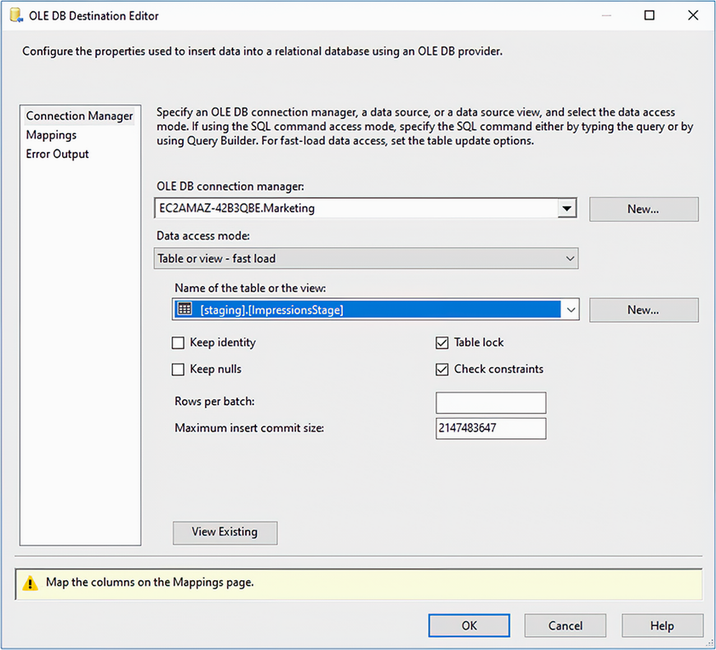
Use the destination editor’s Connection Manager page to verify the selected OLE DB connection and target-loading setup before running the package. section 6.1
Nightly reporting load
A one-million-row flat file may save only seconds after tuning, but large nightly advertising loads can contain hundreds of millions of impressions and must finish before the business day. Test buffer and batch sizes against the real workload; measured runs show that larger settings can improve time up to a point rather than indefinitely. section 6.2
Use this safer loading checklist:
- Keep incoming data where possible: use expansive staging-table column types and redirect bad rows to an error-handling table rather than silently discarding them. section 6.5
- Select only the source columns and rows required by the data flow; filter at source with a SQL command when full-table extraction is unnecessary. section 6.5
- Test OLE DB destination fast-load and buffer configurations in the target environment, especially when the ETL window is tight. section 6.2 section 6.5
