Run `ollama serve` to start the Ollama service and keep it running while it waits for requests. It listens at 127.0.0.1:11434: localhost means this computer, and the port is like a numbered door. section 3.4.1
At startup, Ollama:
- Checks available hardware, memory, and whether it can use GPU or Neural Engine acceleration. section 3.4.3
- Opens port 11434 and waits for requests from terminal commands, Python scripts, or browsers. section 3.4.3
- Occupies the current terminal. Leave it running and use a second terminal for other commands. section 3.4.1
Figure 3.3 The Ollama startup sequence. Steps ①–⑥ happen in order when you run ollama serve. Once Ollama reaches the “Ready!” state, it can receive requests from three different sources simultaneously: terminal commands, Python scripts, and browser requests.
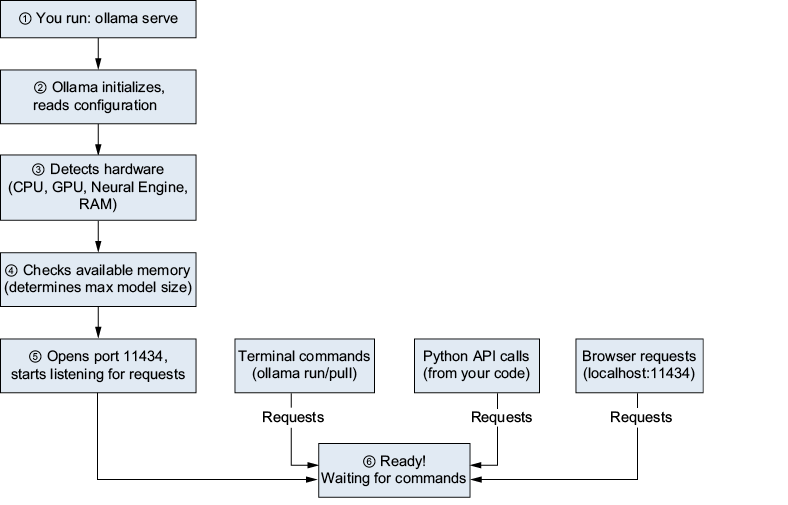
Follow the startup sequence to see how Ollama reaches its ready state and accepts requests. section 3.4.3
