OnIdiom is a XAML markup extension that supplies different values for a property according to the device idiom. It keeps phone, tablet, desktop, watch, and TV adjustments in the same XAML file. section 10.3.2 section 10.4
Use an idiom-specific value when a layout needs to behave differently:
- Set spacing to 10 on desktop, 30 on phone, and 20 by default. section 10.3.2
- Set a Grid margin to 20 on phones and 0 by default. section 10.3.2
- Combine OnIdiom with AppThemeBinding when a value depends on both device idiom and light or dark theme. section 10.3.2
- Use Default as the standard value, changing it only for the idioms that need a different treatment. section 10.3.2
A responsive report page
A report page can use two columns and a card-like view on phones, then five columns and a tabular view on desktops. OnIdiom can change the column count, move the count binding, and toggle desktop-only labels with IsVisible. For example: <LinearItemsLayout ItemSpacing="{OnIdiom Desktop=10, Phone=30, Default=20}" />. section 10.3.2
Figure 10.16 The OnIdiom markup extension is used to specify different values depending on the device idiom. In this example, different strings are assigned to the Text property of a label depending on whether it is running on a desktop or a phone.
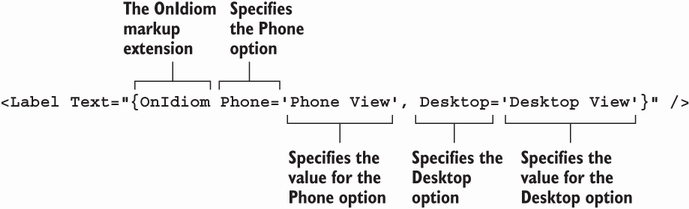
Compare the label text assigned for desktop and phone idioms in the visual example. section 10.3.2
