An open redirect attack abuses a trusted application to send users to an attacker-controlled external site. The usual path is a login flow that remembers the previous page in a returnUrl parameter. section 29.4.1
A malicious login link
A user visits an online store and clicks Buy, so the app sends them to login with the product page as returnUrl. An attacker changes returnUrl to a malware site and persuades the user to open that login link. After authentication, a vulnerable app redirects the user to the malicious site. section 29.4.1
Prevent open redirects by validating every supplied destination before redirecting:
- Accept only local URLs belonging to the application; use Url.IsLocalUrl(returnUrl), and send invalid values to the application home page. section 29.4.1
- Use LocalRedirect() when appropriate; it throws an exception if the supplied URL is not local. section 29.4.1
- ASP.NET Core Identity's default UI already validates the login return URL. section 29.4.1
Figure 29.9 An open redirect makes use of the common return URL pattern. This is typically used for login pages but may be used in other areas of your app too. If your app doesn’t verify that the URL is safe before redirecting the user, it could redirect users to malicious sites.
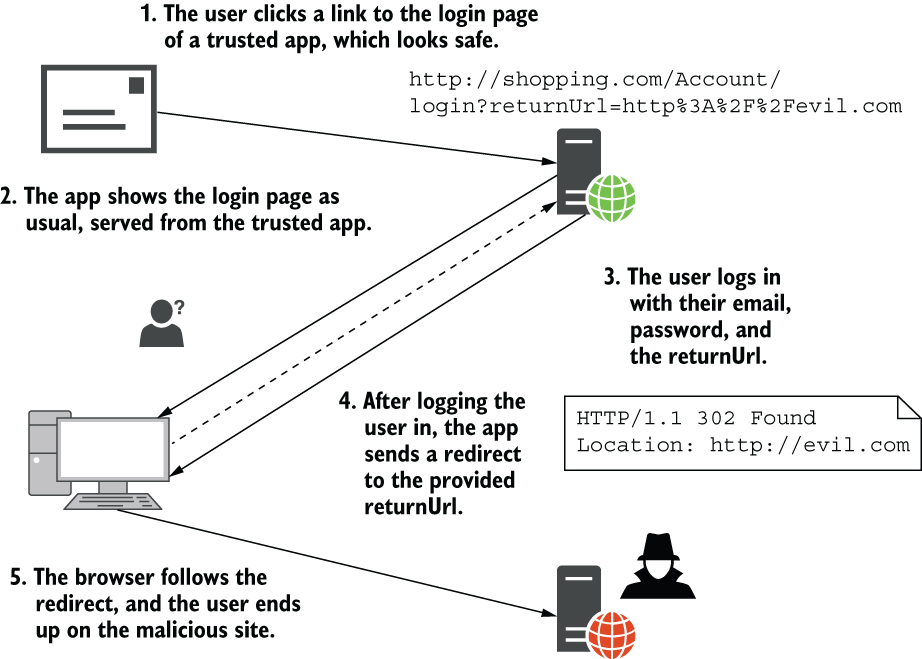
Trace how a familiar return-URL pattern becomes an open redirect when the destination is not checked. section 29.4.1
Listing 29.5 Detecting open redirect attacks by checking for local return URLs
[HttpPost]
public async Task<IActionResult> Login(
    LoginViewModel model, string returnUrl = null)   #1
{
    // Verify password, and sign user in

    if (Url.IsLocalUrl(returnUrl))                   #2
    {
        return Redirect(returnUrl);                  #3
    }
    else
    {
        return RedirectToPage("Index");              #4
    }
}
Review a C# login action that redirects locally when safe and returns to the application home page otherwise. section 29.4.1

