OpenCV is a Python computer vision library used to connect a robot application to its camera, process image frames, present graphical previews, and respond to keyboard input. A camera feed can supply reusable building blocks for snapshots, face detection, QR-code decoding, and robot movement driven by what the camera sees. section 8.3 section 1.3.5
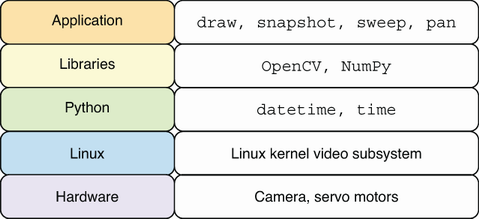
OpenCV sits between the camera hardware and Python applications, capturing images through the Linux video subsystem for drawing and camera-control programs. section 8.2
Use OpenCV to build camera features incrementally:
- Open the default camera with cv2.VideoCapture(0), verify it with isOpened(), inspect dimensions and frame rate, read frames, save images, and release the device when finished. section 8.3.1
- Treat each captured frame as a NumPy ndarray; a 640×480 color frame has three channels and uint8 values. section 8.3.1
- Draw circles, lines, rectangles, markers, and text directly onto image frames. OpenCV color tuples use BGR rather than RGB ordering. section 8.3.2
- Keep a preview responsive with cv2.waitKey(1), which returns keyboard codes while handling GUI events; map keys to capture, exit, or robot actions. section 8.3.3
- Prepare a face image by converting it to grayscale and equalizing its histogram, then detect faces, mark the match, and return its center coordinates. section 9.3.2
- Create a QRCodeDetector to detect and decode a QR code, draw its four-corner boundary, and overlay the decoded data. section 10.3.2
Live snapshot preview
A camera application opens the default device, loops over captured frames, and displays each frame in a preview window. Pressing Space saves a timestamped JPEG and briefly overlays a “saving photo...” message; Esc or Q exits, after which the capture device is released. Assertions stop the program if the camera cannot open or a frame cannot be read. section 8.3.3
Detection results become physical control data. A detected face rectangle yields a center point, and that point can determine which direction to move pan and tilt servos. QR-code detection similarly supports a robot searching its environment for matching encoded data. section 9.3 section 10.0
