OpenGL is a graphics specification that gives applications a standard interface to rendering across different hardware. Vendors provide implementations through drivers, so programmers can target OpenGL rather than each device separately. The specification does not itself require hardware acceleration, even though GPUs commonly provide it. section 7.1 section 7.1.3
OpenGL 3.3 Core offers a practical target: it has the features needed for the rendering examples and runs on hardware dating back before 2010. OpenGL’s long history also brings boilerplate and awkward decisions; portability comes with some baggage. section 7.1.1
OpenGL handles rendering, not the whole graphical application. A desktop environment must provide a window and coordinate input. GLFW supplies a cross-platform way to create windows and handle input while OpenGL configures and runs the rendering pipeline. section 7.1.3 section 7.6
A draw call starts the rasterization pipeline:
- Supply vertices and configure the draw call with the geometry to render. section 7.1.2
- Run a vertex shader to process vertices, then assemble the geometry and rasterize it into fragments. section 7.1.2
- Run a fragment shader to determine fragment colors, then write the resulting image to a framebuffer. section 7.1.2 section 7.6
Figure 7.1 The rasterization pipeline
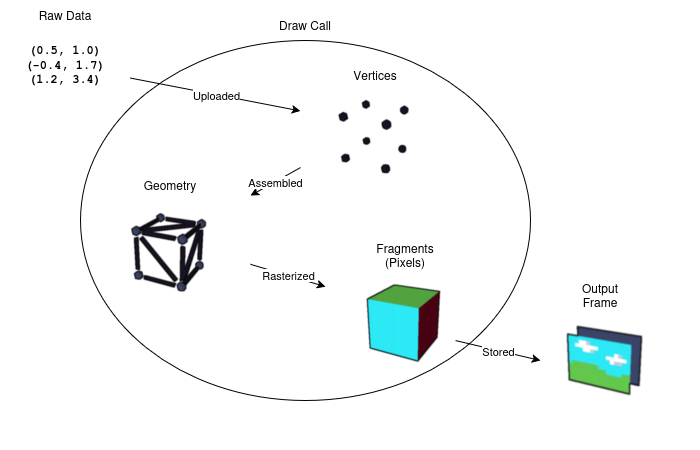
Follow the pipeline from geometry to image and see where the shader stages fit. section 7.1.2
OpenGL is state tied to a context. Its objects refer to stored data and state, including shaders, images, and geometry. To use shaders, an application supplies their source, compiles shader objects, and links them into a program object. section 7.6 section 7.4.3
A minimal shader pair
A vertex shader can pass a two-dimensional position into gl_Position, while a fragment shader assigns every fragment the same color. These GLSL sources use version 330 core and can be stored as Zig multiline strings. section 7.4.3
Listing 7.9 Shader sources
const vertex_shader_source =
    \\#version 330 core #1
    \\
    \\in vec2 pos; #2
    \\
    \\void main() {
    \\    gl_Position = vec4(pos, 0.0, 1.0); #3
    \\}
;
const fragment_shader_source =
    \\#version 330 core #1
    \\
    \\out vec4 fragColor; #4
    \\
    \\void main() {
    \\    fragColor = vec4(1.0, 0.0, 1.0, 1.0); #5
    \\}
;
Inspect the position-passing vertex shader and constant-color fragment shader. section 7.4.3
Listing 7.10 Acting like a compiler
fn compileShader(
    kind: c_uint, #1
    source: [:0]const u8, #2
) error{ShaderCompilationFailed}!c_uint { #3
    const shader = c.glCreateShader(kind); #4
    errdefer c.glDeleteShader(shader); #4

    c.glShaderSource(shader, 1, @ptrCast(&source), null); #5
    c.glCompileShader(shader); #5

    var compile_success: c_int = undefined;
    c.glGetShaderiv(shader, c.GL_COMPILE_STATUS, &compile_success); #6
    if (compile_success == 0) { #6
        var info_buf: [512]u8 = undefined;
        var info_len: c.GLsizei = undefined;
        c.glGetShaderInfoLog(shader, info_buf.len, &info_len, &info_buf); #7
        const info = info_buf[0..@intCast(info_len)];

        std.debug.print("shader compilation failed: {s}\n", .{info}); #7

        return error.ShaderCompilationFailed;
    }

    return shader;
}
See the practical compilation steps: create a shader, supply source, compile, check errors, and clean up on failure. section 7.4.3
