A component hierarchy breaks a large interface into smaller components, each responsible for part of the view and its user interaction. Components compose as a tree: a root component returns children, and those children return further virtual DOM nodes. section 3.8 section 3.8.3
Build the hierarchy by assigning focused responsibilities:
- Make the application component the root and group multiple returned children in a fragment when one virtual DOM root is required. section 3.8.3
- Decompose a view into named child components, such as CreateTodo and TodoList, instead of keeping the entire interface in one function. section 3.8
- Continue downward when a child has its own structure: TodoList renders TodoItem components, which select read or edit subcomponents. section 3.8.3
- Keep each component as a pure function that receives relevant data and generates its portion of the virtual DOM. section 3.8.3
TODO application tree
App is the root. It renders an h1 element, CreateTodo, and TodoList inside a fragment. TodoList renders a ul containing TodoItem components; each TodoItem renders either TodoInReadMode or TodoInEditMode. The resulting component tree mirrors the application view and the virtual DOM nodes each component produces.
Figure 3.9 The hierarchy of components of the TODOs application, in which each component has its child virtual DOM nodes below itself
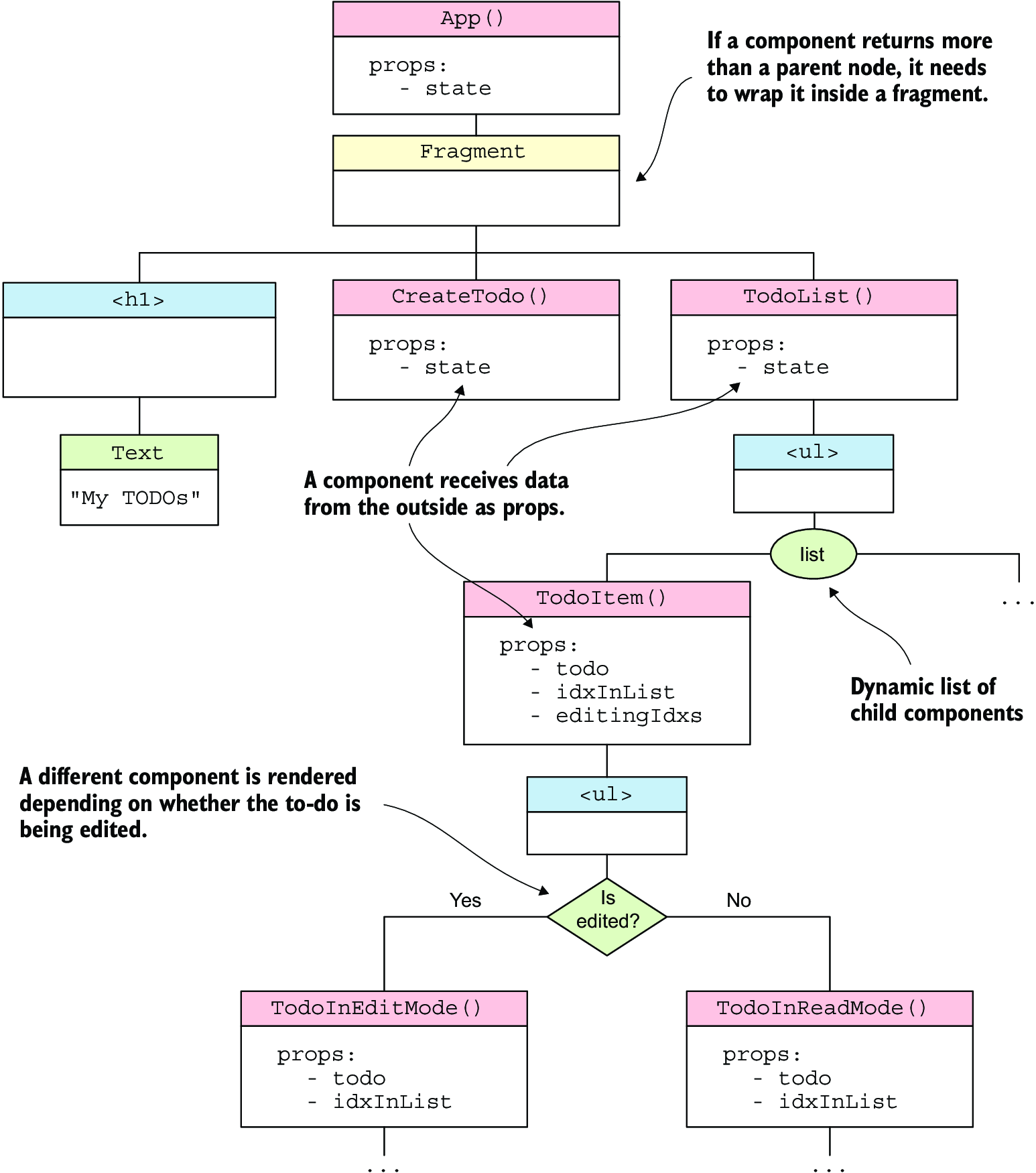
Browse the tree to see the root component, nested component functions, fragments, and the virtual DOM nodes generated beneath them. section 3.8.3
