An origin certificate authenticates the server hosting an application and lets Cloudflare connect to it over HTTPS. Cloudflare serves a separate edge certificate to visitors; the origin certificate protects the connection between Cloudflare and the origin host. section 12.2.4 section 12.1.3
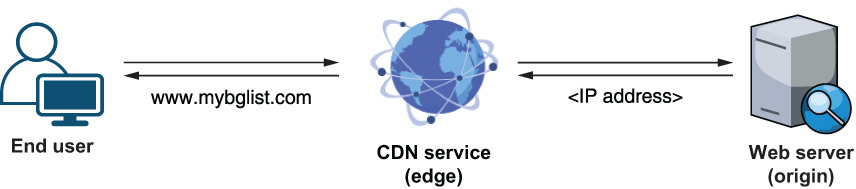
The edge-origin pattern shows where the certificate is used: between the CDN edge and the origin server. section 12.1.3
Create and install an origin certificate through this deployment sequence:
- Open Cloudflare’s SSL/TLS Origin Server settings and create a certificate with Cloudflare-generated RSA 2048 private key and CSR, default hostnames, and a 15-year lifetime. section 12.2.4
- Save the generated certificate and private key in a secure local folder; these files are needed when configuring the origin host. section 12.2.4
- Convert the PEM certificate and KEY file to a PFX (PKCS#12) file with OpenSSL, because IIS cannot directly import the original format. section 12.3.5
- Protect the generated PFX with an export password, then import it through IIS Manager; delete the original PEM and KEY files after conversion when they are no longer needed. section 12.3.5
Convert the certificate for IIS
From the folder containing the certificate files, run OpenSSL’s PKCS#12 export command: "C:\Program Files\OpenSSL-Win64\bin\openssl.exe" pkcs12 -export -out mybglist_origin.pfx -in mybglist_origin.pem -inkey mybglist_origin.key. Enter and confirm an export password to generate the PFX file. section 12.3.5
