A memory error occurs when a model-training step cannot continue because available memory is insufficient. Processing datasets as small mini-batches avoids loading the entire dataset into memory at once. section 7.2.2
Handle memory errors through two complementary practices:
- Reduce batch size so training consumes the dataset sequentially instead of materializing it all in memory. section 7.2.2
- Record memory usage and data availability during workflow execution, then use the failure metadata to decide whether to restart ingestion or increase requested memory. section 6.3.2
Diagnosing a training failure
A training step records memory every five minutes and detects a spike from 23 MB to 200 MB after 30 minutes. Increasing requested memory allows the step to produce the trained model. section 6.3.2
Figure 7.6 The dataset is divided into two batches and processed sequentially. The first batch is consumed to train the model at time t0, and the second batch is consumed at time t1.
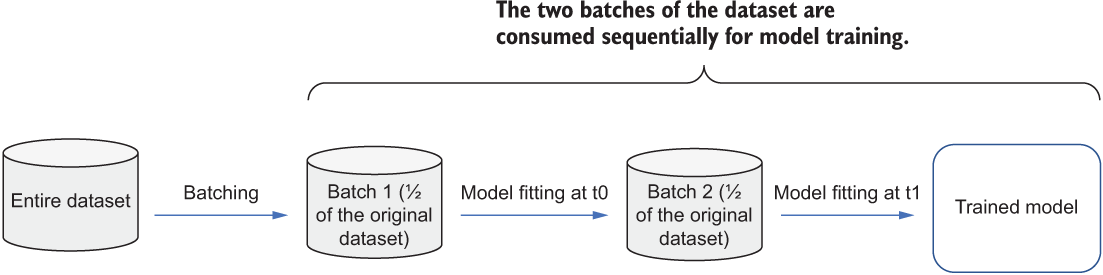
Shows a dataset divided into two batches and consumed sequentially, illustrating how batching limits in-memory data. section 7.2.2
Figure 6.16 An example workflow where the model training step failed, with the metadata collected showing an unexpected memory spike during runtime
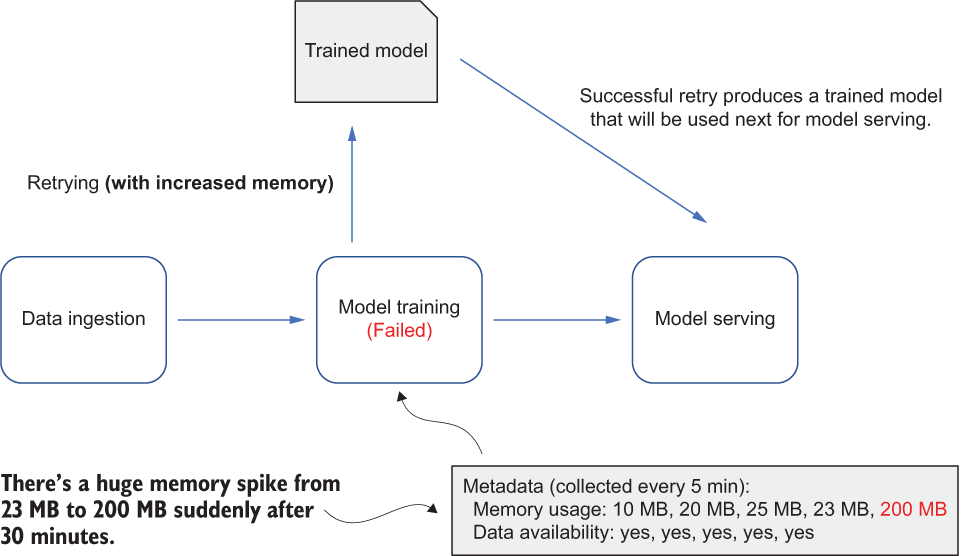
Shows runtime metadata revealing an unexpected memory spike during a failed model-training workflow. section 6.3.2
